
Question

Freshdesk and Salesforce Connector - Create Lead Form


Forum|alt.badge.img

Looking to get some advice.


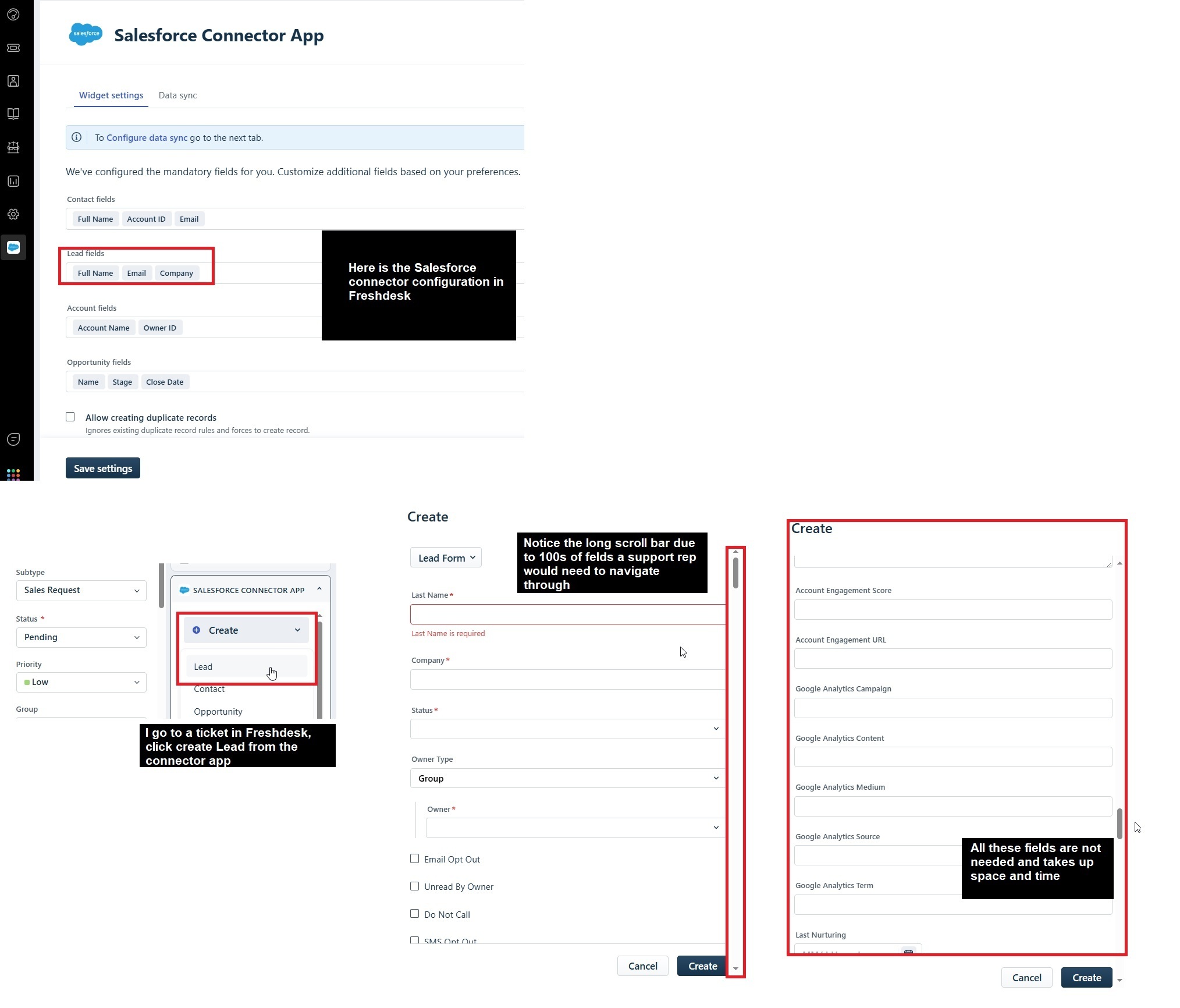
I connected Salesforce Connector to our Freshdesk. My goal is our Support reps take their Freshdesk ticket and create a Lead in Salesforce. I go to the ticket, I click on the Salesforce Connector and click on Create Lead.


The Lead Form that pops up consists of every (over 100) field that are in our Salesforce. And I would have to scroll through all of them and fill out the needed ones and create the lead. All I really need are a few fields that are required for a Lead to be submitted.


When I go to the Salesforce Connector App, I see under Widget Settings, under Lead fields, I just have Full Name, Email, and Company.


But still when actually using the app, the Lead Form that comes up is essentially unusable due to how many fields it displays. How can I configure the Lead Form in Freshdesk to only display fields that I need?



4 replies

eeha0120
Top Contributor ⭐
Forum|alt.badge.img+12
  • Top Contributor ⭐
  • April 9, 2025

Hi ​@Kamakshi V 

This seems to be related to FreshDesk but was posted under FreshService.

Would you mind moving this thread accordingly?


Regards,


Kamakshi
Forum|alt.badge.img+11
  • Former Community Manager
  • April 9, 2025

Done! Thanks for the ping ​@eeha0120 !!!


Ra89z
Apprentice
Forum|alt.badge.img
  • Apprentice
  • September 18, 2025

​@kjoseph Did you figure out how to modify that form? I have the same question for the contact form, but unable to find a place to actually modify it..


Forum|alt.badge.img
  • Author
  • Apprentice
  • September 18, 2025

​@Ra89z unfortunately no. I tried to work with FreshDesk support, and they looked at it and ended with “it's a Salesforce issue”. Tried working with Salesforce and they looked at it and “it’s a FreshDesk issue”. In the end, we gave up and removed the widget because it is not usable in its current state.