Question

Auto associate an Asset

  • January 9, 2026
  • 1 reply
  • 34 views

Forum|alt.badge.img+1

Hi All


I have a Service Catalog form for the process of replacing assets due for refresh. There is a dropdown field where the data source is the asset list. I would like to use that value to automatically associate the asset to the newly created ticket. Can i do this through the workflow automator? If so how?


Ideally once I have got this working I want to intrgrate this into other workflows with associating assets. Updating asset states/assignee’s if possible


1 reply

  • Community Debut
  • January 13, 2026

Haven’t done this use case scenario.  But, it is doable if you’re willing to use the API. It is a bit of a PIDA though.  

The PIDA is the service catalog item drop down field in the workflow really only gives you 2 things.  1. the name of the asset and 2. the background ID of the Asset.   The issue is the API needed to add an asset to a ticket needs the display id NOT the background ID. ( I call it a background ID , FreshService has different terms for the number when I see it. In the API it is just called “ID”.   )

If you don’t have any duplicate names in your assetDB all is good, but that’s not realistic.

So just a quick thought would be do an API asset search via the name of the asset, then get the exact asset you’re needing, by filtering the json results with the background ID.  

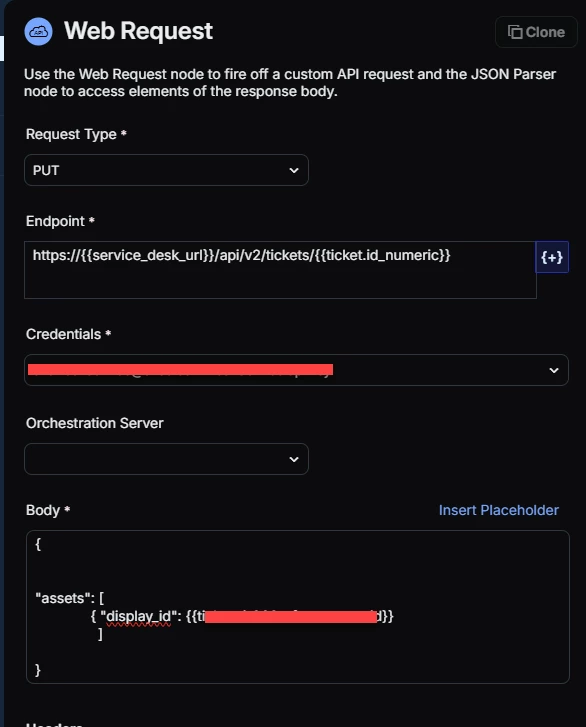
Once you have the exact asset you need, then you also have the display id which could then be used for the screenshot below. 

Below is a screenshot of what the last web request would look like.