Answer

Can FreshService integrate with Power Automate to automate certain things?

  • July 16, 2021
  • 5 replies
  • 2821 views

Forum|alt.badge.img

Hi there

Can FreshService integrate with Power Automate (Microsoft O-365)  to automate certain things? How?

Thank you.

Best answer by zachary.king

Hello @manuplusplus,

Yes it can. You can use this connector 
 or you can create your own connectors and use the freshservice API (https://api.freshservice.com/v2/) to perform automations on tickets. Make sure to look at the workflow automator in freshservice and the use of webhooks as this is a great way to automate with the interaction of third party tools.


Take care,

Zach

5 replies

zachary.king
Top Contributor ⭐
Forum|alt.badge.img+16
  • Top Contributor ⭐
  • Answer
  • July 26, 2021

Hello @manuplusplus,

Yes it can. You can use this connector 

 or you can create your own connectors and use the freshservice API (https://api.freshservice.com/v2/) to perform automations on tickets. Make sure to look at the workflow automator in freshservice and the use of webhooks as this is a great way to automate with the interaction of third party tools.


Take care,

Zach


Forum|alt.badge.img+9

@manuplusplus If you still need help with this let me know.  The standard connecter is really bad.  I have a method that works really well for integration and use it all the time. 


Forum|alt.badge.img
  • Author
  • Apprentice
  • November 20, 2021

Hi @patricksawyer 

Yes, that will be great if you can share your approach/method for this.

Thank you so much. 


Forum|alt.badge.img+9

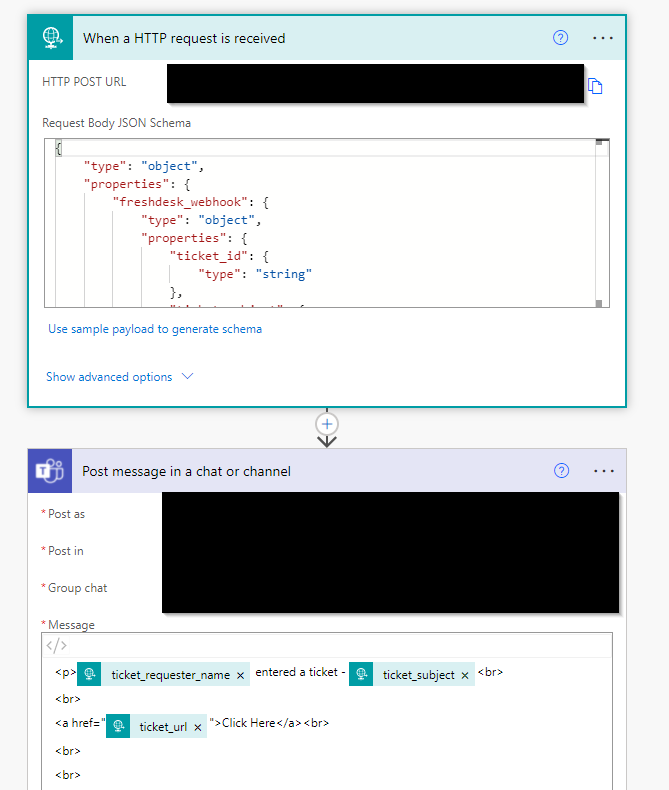
If you want to use a Freshservice event to trigger something in O365 do the following.


  • Create a Workflow Automator in Freshservice, the action will trigger a POST webhook.
  • You then use the “When and HTTP request is received” trigger.  Save the flow and get the URL.
  • Go to Freshservice and trigger the automation.  This will pass the payload to PA
  • Go back to PA and check your log, copy the code.
  • In PA go to the trigger and paste the code in the “Use sample payload to generate schema”
  • Now all of your FS fields (that you picked) are available in PA
  • You can then do whatever you want with these fields.


If you need additional help private message me.  This should take no longer than 5-10 minutes to setup.


Forum|alt.badge.img
  • Contributor
  • May 30, 2023

Hi @patricksawyer,


I have sent you a private message regarding this.