Solved

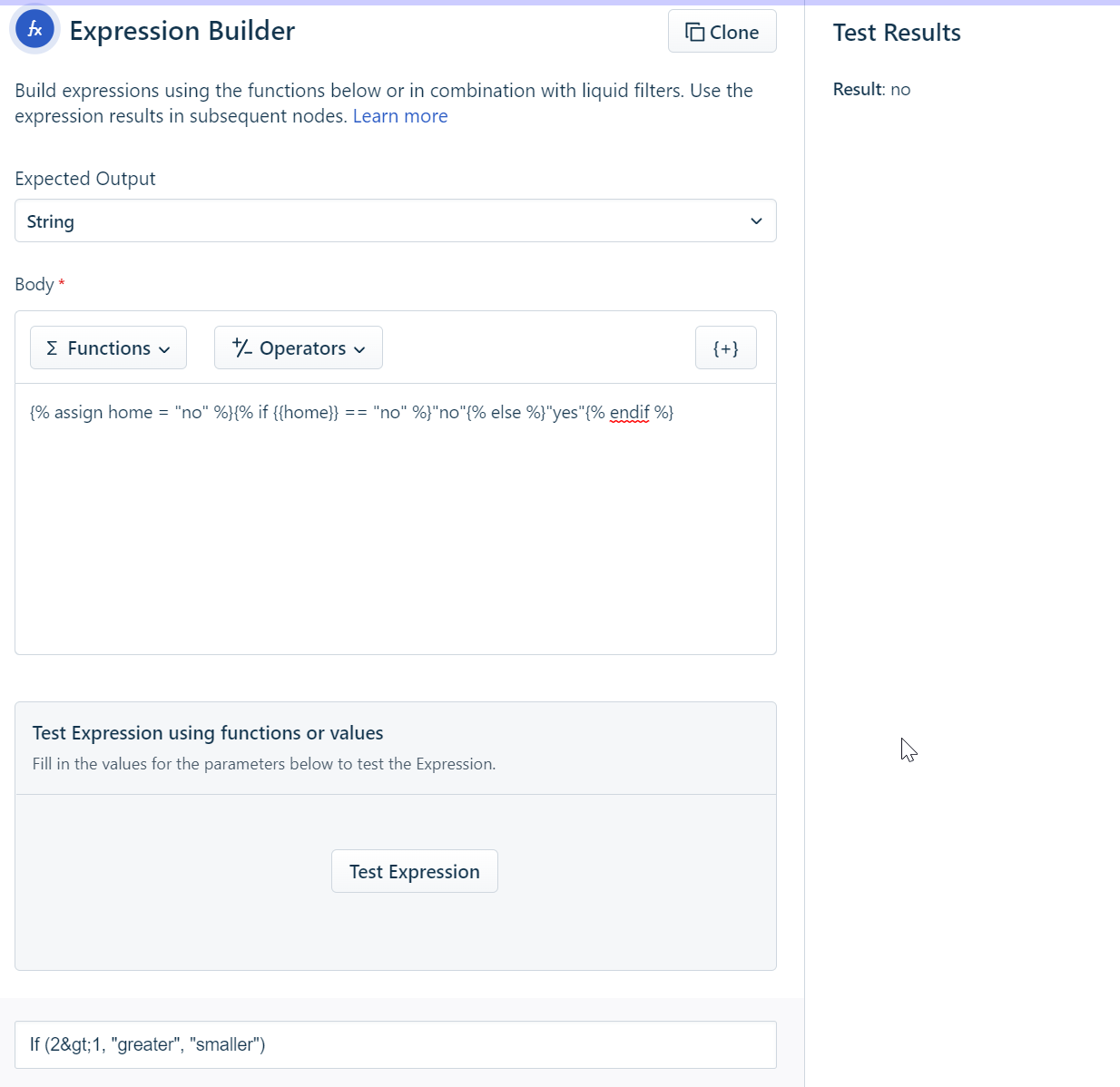
Expression Builder with Liquid expressions.

  • April 29, 2022
  • 34 replies
  • 2894 views

Show first post

34 replies

Daniel Söderlund
Top Contributor ⭐
Forum|alt.badge.img+14

@zachary.king  I hope you hade a good 4th July.
How did it go with the Freshservice support ? 

Hey @daniel.soderlund, thank you. Was a nice weekend to get away. Regarding the Expression Builder, the issues has been escalated to the backend team to take a look at. No resolution as of yet, but once I have one I will be happy to share it here.

Hi, heard anything new on this ? 


zachary.king
Top Contributor ⭐
Forum|alt.badge.img+16
  • Top Contributor ⭐
  • July 21, 2022

Hello @daniel.soderlund, they are still working on it. it looks to be an issue with the liquid placeholders. So they have some engineers taking a look at it. Have not gotten a full resolution yet.


zachary.king
Top Contributor ⭐
Forum|alt.badge.img+16
  • Top Contributor ⭐
  • August 8, 2022

So after a decent amount of troubleshooting by the development team they were able to help me get an expression to work that achieved the result I was looking for. It appears that it required additional methods from the Liquid Language, in my case it was the “append” method. So my assumption with the difficulty using the expression builder and placeholders syntax is figuring out how much to alter with the Liquid Language and how much to use the expression builder’s functions.

@daniel.soderlund I hope that helps some, but it is still a little vague, I know.


John Dorian
Community Debut
Forum|alt.badge.img+1
  • Community Debut
  • October 20, 2022

Does any one else have an issue when you copy paste into the expression builder it removes all formatting ………. seems i can type all day long and hit enter but as soon as i paste…

And no undo options super frustrating

Maybe it’s just a firefox issue?


Daniel Söderlund
Top Contributor ⭐
Forum|alt.badge.img+14

Does any one else have an issue when you copy paste into the expression builder it removes all formatting ………. seems i can type all day long and hit enter but as soon as i paste…

And no undo options super frustrating

Maybe it’s just a firefox issue?

What do you mean formating? Like new line and tabs? 
The node uses one line format. 


John Dorian
Community Debut
Forum|alt.badge.img+1
  • Community Debut
  • October 20, 2022


What do you mean formating? Like new line and tabs? 
The node uses one line format. 

Probably, one line format is frustrating. But odd it will let you hit enter all day long as long as you’re staying in the box.


Daniel Söderlund
Top Contributor ⭐
Forum|alt.badge.img+14


What do you mean formating? Like new line and tabs? 
The node uses one line format. 

Probably, one line format is frustrating. But odd it will let you hit enter all day long as long as you’re staying in the box.
 

I tend to write my expression in notepad++ so I get it correct then I copy/paste it to the node. 


John Dorian
Community Debut
Forum|alt.badge.img+1
  • Community Debut
  • October 20, 2022


What do you mean formating? Like new line and tabs? 
The node uses one line format. 

Probably, one line format is frustrating. But odd it will let you hit enter all day long as long as you’re staying in the box.
 

I tend to write my expression in notepad++ so I get it correct then I copy/paste it to the node. 

That’s how i do it as well, but as janky as the expression builder is right now the ability to do a quick tweak on it would be great.

Also for when you need to edit, and copy it out from there later on………. it just seems silly to have a one line box there.


As long as it’s not just me ……..:) Thanks for the responses.


Gonzalo.R
Community Debut
  • Community Debut
  • February 21, 2023

I was pretty proud of this one - it will search the {{ticket.description}} field and pull out the Client Name which it finds after the words “Client Name :”  and before “Environ”.  Works great!


substring('{{ticket.description}}', (indexOf('{{ticket.description}}','Client Name :',0)+14), indexOf('{{ticket.description}}','Environ',0))


Expected Output = String

Results = Company Name 


Hi there! This is exactly what I was looking for one of my automations, however, this always returns a non-breaking space (\U00A0) at the end of the result, any ideas on how to get rid of it? I’ve tried a bunch of liquid filters on the result and it just keep appearing sometimes.