

Question

How can a user provide Feedback?

  • December 8, 2023
  • 11 replies
  • 67 views

msconfig87
Top Contributor ⭐
Forum|alt.badge.img+10

Currently the user can give feedback when

  • creating a ticket and filling out a survey
  • providing feedback though the Solution Article Feedback

How can we achieve that a user can provide general feedback or ideas directly from the front page?

Maybe with a custom button? Or is there any other way?

11 replies

msconfig87
Top Contributor ⭐
Forum|alt.badge.img+10
  • Author
  • Top Contributor ⭐
  • December 8, 2023

sounds interesting. Do you have an Idea how such a feedback Widget could be created?


Daniel Söderlund
Top Contributor ⭐
Forum|alt.badge.img+14

Adding a card that points to a Service item ? 


Daniel Söderlund
Top Contributor ⭐
Forum|alt.badge.img+14

sounds interesting. Do you have an Idea how such a feedback Widget could be created?

don’t get fooled by “AI” bots ;) 


zachary.king
Top Contributor ⭐
Forum|alt.badge.img+16
  • Top Contributor ⭐
  • December 11, 2023

Hey @msconfig87, haven’t tried this but what if you were to embed the feedback widget on your support portal home page?


msconfig87
Top Contributor ⭐
Forum|alt.badge.img+10
  • Author
  • Top Contributor ⭐
  • December 11, 2023

Hey @msconfig87, haven’t tried this but what if you were to embed the feedback widget on your support portal home page?


Do you have a link to an wiki page for that to see how that works? Haven't found it so far..


Daniel Söderlund
Top Contributor ⭐
Forum|alt.badge.img+14

Hey @msconfig87, haven’t tried this but what if you were to embed the feedback widget on your support portal home page?


Do you have a link to an wiki page for that to see how that works? Haven't found it so far..

That one I over looked. 


Found this page about it Feedback Widget : Freshservice


zachary.king
Top Contributor ⭐
Forum|alt.badge.img+16
  • Top Contributor ⭐
  • December 11, 2023

Thanks @Daniel Söderlund for the assist! @msconfig87 it is easy to overlook, mostly made to embed a way to create tickets from other webpages but might work for your use case.


msconfig87
Top Contributor ⭐
Forum|alt.badge.img+10
  • Author
  • Top Contributor ⭐
  • December 12, 2023

looks promising. Do you know if the fields can be prefilled somehow?


zachary.king
Top Contributor ⭐
Forum|alt.badge.img+16
  • Top Contributor ⭐
  • December 12, 2023

looks promising. Do you know if the fields can be prefilled somehow?

I don’t see a way to do so in the Admin UI but I imagine it is possible by modifying the Script Tag that contains the code for the widget. Freshservice support might be able to help with that. Other option is to capture the ticket using workflow and populate the ticket fields as necessary.


msconfig87
Top Contributor ⭐
Forum|alt.badge.img+10
  • Author
  • Top Contributor ⭐
  • December 20, 2023

I found an article about pre-populating the fields: https://partnersupport.freshworks.com/en/support/solutions/articles/154064-pre-populating-feedback-widget-form


However, now I am stuck with actually adding the script section to the portal. Somehow it does not show up when adding it in the Portal customization. Has anyone tried that yet? It says to be added to the body section, but that is not available as it seems.


zachary.king
Top Contributor ⭐
Forum|alt.badge.img+16
  • Top Contributor ⭐
  • December 22, 2023

I found an article about pre-populating the fields: https://partnersupport.freshworks.com/en/support/solutions/articles/154064-pre-populating-feedback-widget-form


However, now I am stuck with actually adding the script section to the portal. Somehow it does not show up when adding it in the Portal customization. Has anyone tried that yet? It says to be added to the body section, but that is not available as it seems.

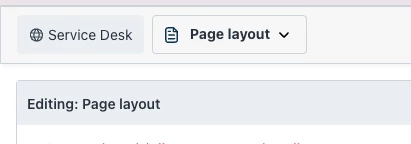
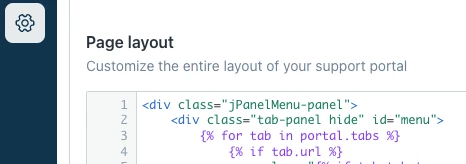
I believe you just need to paste the script on the “Page Layout”. For the new no-code designer it would go here

Older version it would go here 

Hope that helps!