

Answer

How to change Teams card with Microsoft Power Automate

  • September 17, 2024
  • 9 replies
  • 90 views

jeroen.heijboer
Skilled Expert

Hello,

I'm busy for a few days to change the adaptive card in MS Teams, via the Fresh workflows I'm using the app “Post message trough Power Automate”:
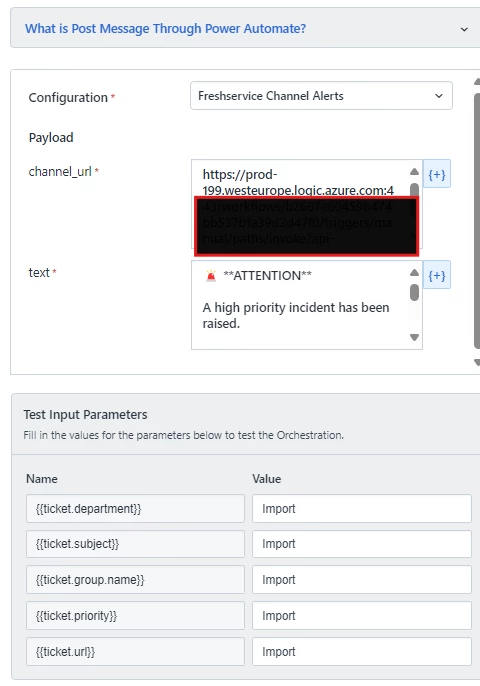
 

Via MS Power Automate it will send a card to my Teams channel, but my subject or other values are not completely visible. See my example;
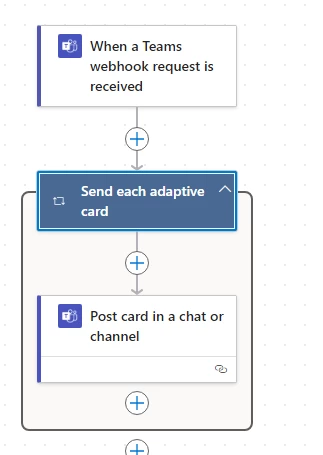
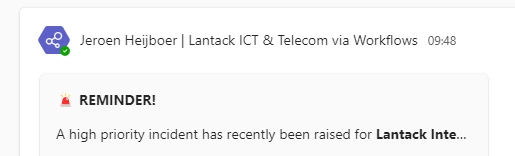
 

Does anyone have any ideas how I can fix this?

Best answer by philip.gardham

@jeroen.heijboer - after doing some experimenting, try removing the content from adaptive card and replace it with this:


{
    "type": "AdaptiveCard",
    "body": [
        {
            "type": "TextBlock",
            "text": "@{triggerOutputs()?['body/attachments'][0]['content']['body'][0]['text']}",
            "wrap": true,
            "maxLines": 0
        }
    ],
    "version": "1.2"
}


I’m sure there are many nicer ways of structuring the cards, but this should give you a basic one that wraps the text output correctly.

9 replies

Forum|alt.badge.img+2
  • Skilled Expert
  • September 17, 2024

Hi Jeroen, 

I am not sure if this gives you the answer, but I found this: MS Teams Connector Deprecation : Freshservice

And now I’m going to investigate if this is something we can use too. It looks interesting. :)


jeroen.heijboer
Skilled Expert
  • Author
  • Skilled Expert
  • September 17, 2024

Hi Jeroen, 

I am not sure if this gives you the answer, but I found this: MS Teams Connector Deprecation : Freshservice

And now I’m going to investigate if this is something we can use too. It looks interesting. :)

Hi Nina, 

Thanks for your reply, I did already the setup to create workflow. 

The workflow is working properly, only I don't know how I can change the card size.


Forum|alt.badge.img+2
  • Skilled Expert
  • September 17, 2024

Oh ok, I wasn’t sure. 
I am sorry, I can’t help you then. :(


David Pietrs
Skilled Expert
Forum|alt.badge.img+5
  • Skilled Expert
  • September 19, 2024

Can you provide the JSON that you’re using in the Post Card in a Chat or Channel power automate action? 


jeroen.heijboer
Skilled Expert
  • Author
  • Skilled Expert
  • September 23, 2024

Can you provide the JSON that you’re using in the Post Card in a Chat or Channel power automate action? 

Hi David, I'm currently using the “content” for now.


Forum|alt.badge.img+4
  • Active Contributor
  • Answer
  • September 24, 2024

@jeroen.heijboer - after doing some experimenting, try removing the content from adaptive card and replace it with this:


{
    "type": "AdaptiveCard",
    "body": [
        {
            "type": "TextBlock",
            "text": "@{triggerOutputs()?['body/attachments'][0]['content']['body'][0]['text']}",
            "wrap": true,
            "maxLines": 0
        }
    ],
    "version": "1.2"
}


I’m sure there are many nicer ways of structuring the cards, but this should give you a basic one that wraps the text output correctly.


alyssia.correa
Forum|alt.badge.img+8

Hey folks, I’m tagging @suvashini.balashanmugam to chip in further!


David Pietrs
Skilled Expert
Forum|alt.badge.img+5
  • Skilled Expert
  • September 30, 2024

Microsoft provides some good resources for designing adaptive cards, this article includes a link to an adaptive card designer that would allow you to test the JSON before putting it into production. 


https://learn.microsoft.com/en-us/microsoftteams/platform/task-modules-and-cards/cards/design-effective-cards?tabs=design


zachary.king
Top Contributor ⭐
Forum|alt.badge.img+16
  • Top Contributor ⭐
  • September 30, 2024

Hello, here is an adaptive card designer that you can use to create your cards. https://adaptivecards.io/designer/

I would also recommend not going above version 1.4, I have seen some weird things with version newer than that.