

Answer

How to update the subject of a ticket?

  • November 2, 2022
  • 3 replies
  • 152 views

msconfig87
Top Contributor ⭐
Forum|alt.badge.img+10

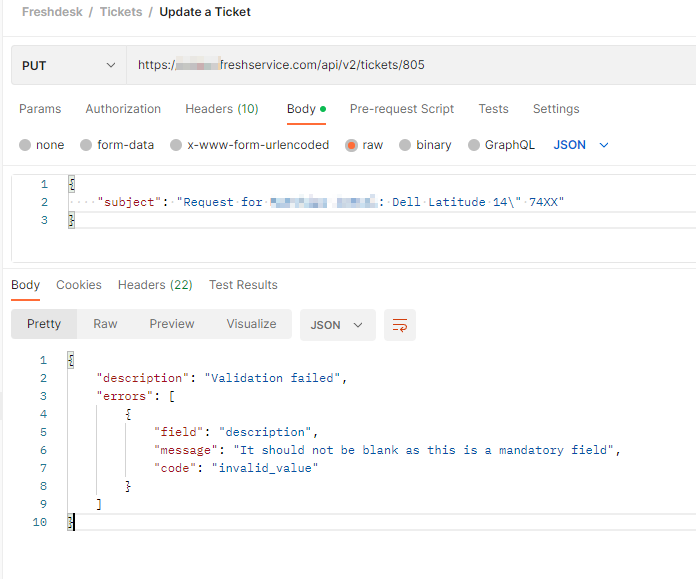
Hello. I need to update the subject from a ticket via API.

I tried to follow this article: https://community.freshworks.com/freshservice-11247/webhook-update-subject-line-when-ticket-logged-16341

But unfortunately this seems not to work! I always get this error:

{
    "description""Validation failed",
    "errors": [
        {
            "field""description",
            "message""It should not be blank as this is a mandatory field",
            "code""invalid_value"
        }
    ]
}


I don’t want to change the description!

How to do this?
 

Best answer by ggallaway

There is an issue with this endpoint when updating service requests. Just add a description, it can just have a period or in our case we put in 'see service item below'


3 replies

Forum|alt.badge.img+8
  • Answer
  • November 3, 2022

There is an issue with this endpoint when updating service requests. Just add a description, it can just have a period or in our case we put in 'see service item below'


afautley
Top Contributor ⭐
Forum|alt.badge.img+11
  • Top Contributor ⭐
  • November 3, 2022

We have the same issue here, I have already mentioned to our CSM @Jack Day. If it is a mandatory field then it should be filled in upon logging an SR via the Portal OOTB. Hopefully a fix will be out in the next release, or the one after...


msconfig87
Top Contributor ⭐
Forum|alt.badge.img+10
  • Author
  • Top Contributor ⭐
  • November 3, 2022

I think it is time to start thinking object oriented and divert between service requests and incidents…

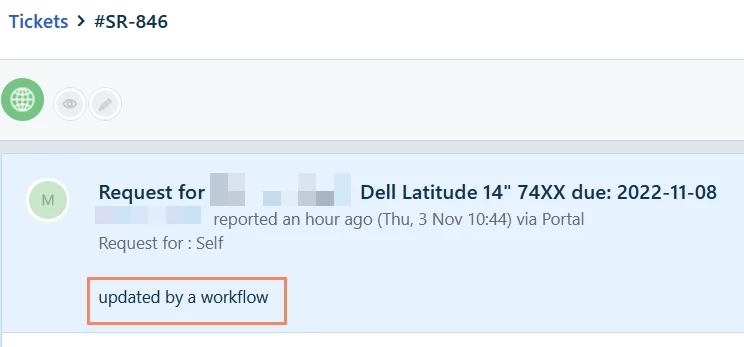
But thanks it worked by adding a random text. even if this text is now visible in the head of the service request...