Answer

Intune Freshservice Discovery Agent 3.5.0 Deployment

  • September 16, 2024
  • 4 replies
  • 348 views

Forum|alt.badge.img+1

Hello guys,


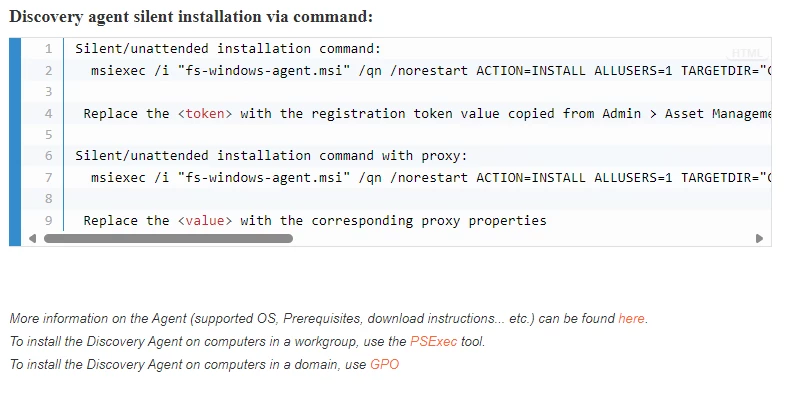
I’m having issues with deploying the new version 3.5.0 of Freshservice Discovery Agent on Intune. Normally it was a simple task as it was just a msi file, but in the new version I need to add a token to the installation. I have the token, but I can't seem to get it to work in a powershell script to silently install it.


Has anyone tried installing the program with the token via powershell silently?


Thanks in advance

Best answer by Dely

actually it worked by me using this script.


Start-Process -FilePath ".\fs-windows-agent-3.5.0.msi" -ArgumentList "/quiet", "REGISTRATIONTOKEN=YourTokenHere"

4 replies

Neomp
Community Debut
  • Community Debut
  • October 1, 2024

….

Exactly the same here: All Installation failed with severe error - looks like it worked before but now not.


Forum|alt.badge.img+3
  • Active Contributor
  • October 1, 2024

Hazeljames_00
Community Debut
Forum|alt.badge.img+1
  • Community Debut
  • October 1, 2024

Hi Dely,

I’ve had a similar issue when deploying Freshservice Discovery Agent 3.5.0 using Intune. Since the new version requires a token for installation, you’ll need to modify your PowerShell script to include it as part of the silent installation.

Here’s an example of a command that worked for me:


powershell

Copy code

msiexec /i "FreshserviceDiscoveryAgent.msi" TOKEN=YourTokenHere /quiet /norestart

Make sure to replace YourTokenHere with your actual token. If the token is correct, this should install the agent silently.

Also, ensure that the MSI and script are properly packaged and uploaded to Intune. Double-check that the token doesn't contain any extra spaces or invalid characters, as this could cause installation issues.

Let me know if this helps or if you're running into any specific errors!


Forum|alt.badge.img+1
  • Author
  • Contributor
  • Answer
  • February 12, 2025

actually it worked by me using this script.


Start-Process -FilePath ".\fs-windows-agent-3.5.0.msi" -ArgumentList "/quiet", "REGISTRATIONTOKEN=YourTokenHere"