I am a small MSP and I need to be able to get a list of resolved and closed tickets at the end of each month for billing.
The filters do not seem to allow me to just get a list of resolved/closed tickets for the month.
On top of that there seems to be no way to get a number from the tickets list for billable hours.
Any suggestions?
Best answer by BrynCYDEF
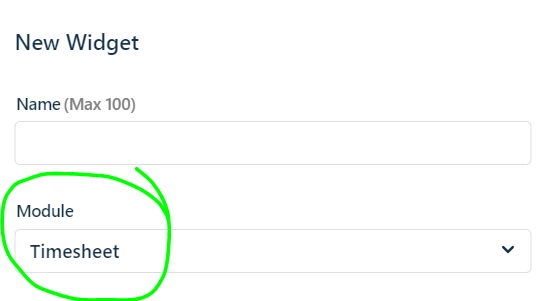
Hi @EZTech - analytics does a lot of crazy stuff backwards - I feel ya. Also there is no join FROM Tickets to Billed Hours but you can go FROM Billed Hours to Tickets - you create the report with widgets from the Timesheet Module.
Back to closed tickets in month. You may prefer to have each company get their own report so set a Report Level Filter for the Department/Company Name.
Presumably you’ve created your report for: Tickets module
Then you’ve added a widget
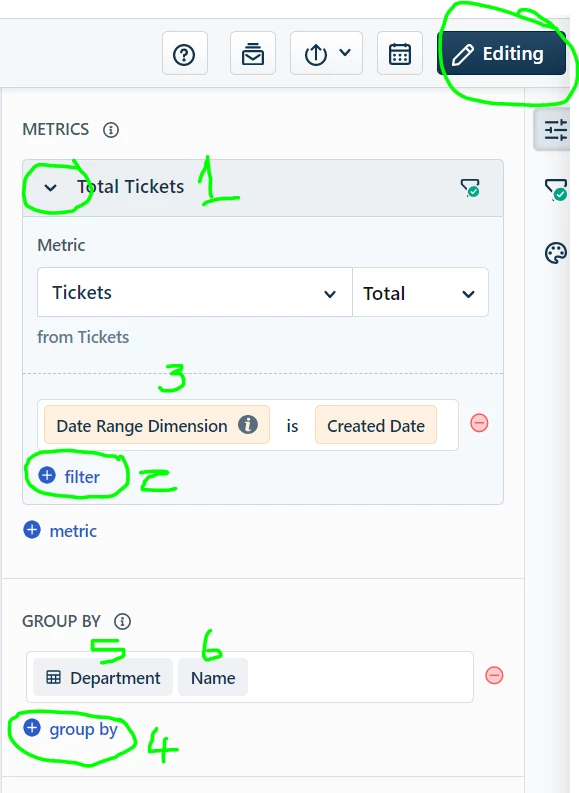
Then click the pencil to edit the widget from the report page.
Then on your 1st metric (Total Tickets which you can rename btw) hit the pulldown arrow to set the (3) Date Range Dimension = Created Date which you then apply at the Report Level so you can restrict to Last Month
On the metric or on the Widget you can add other filter(s) as desired (2) e.g Status = closed or resolved ( You could even add a 2nd metric with the closed count and leave the Total Tickets in there)
Then add your Group by (4) - type in Department (5) because that’s how its called then select Name (6)
In 750 easy clicks you have 2 separate reports that probably have most of what you’re looking for. TahDah!
Hello @EZTech You should be able to get the metric of resolved/closed tickets for a specific time period using Freshservice Analytics module. From there once you create your metric you can see the underlying data which will show you your list of tickets.
I was able to get that far but that seems like more clicks than necessary. Especially since I can’t build off of that data and make reports as I can’t group by company either.
Hi @EZTech - analytics does a lot of crazy stuff backwards - I feel ya. Also there is no join FROM Tickets to Billed Hours but you can go FROM Billed Hours to Tickets - you create the report with widgets from the Timesheet Module.
Back to closed tickets in month. You may prefer to have each company get their own report so set a Report Level Filter for the Department/Company Name.
Presumably you’ve created your report for: Tickets module
Then you’ve added a widget
Then click the pencil to edit the widget from the report page.
Then on your 1st metric (Total Tickets which you can rename btw) hit the pulldown arrow to set the (3) Date Range Dimension = Created Date which you then apply at the Report Level so you can restrict to Last Month
On the metric or on the Widget you can add other filter(s) as desired (2) e.g Status = closed or resolved ( You could even add a 2nd metric with the closed count and leave the Total Tickets in there)
Then add your Group by (4) - type in Department (5) because that’s how its called then select Name (6)
In 750 easy clicks you have 2 separate reports that probably have most of what you’re looking for. TahDah!
@EZTech - I’ve found the same thing, took me a whole lot of time to get what I needed out of analytics and you can get 2 hours in and find you hit some limitation and you’re back to square one! Got there in the end though