Question

Reposition widget(s) within ticket view

  • September 12, 2024
  • 4 replies
  • 29 views

Chris.Armitage
Skilled Expert
Forum|alt.badge.img+1


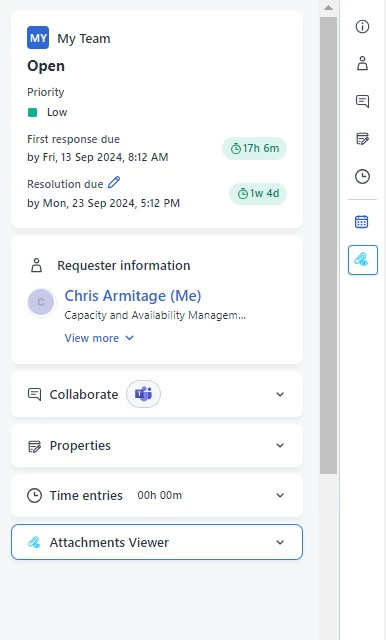
How do i change the widget order for agents when viewing a ticket? in the image provided id like to move attachment viewer higher up but cant for the life of me work out how? Im fairly new to system so still finding my way round

 

4 replies

ITMike
Top Contributor ⭐
Forum|alt.badge.img+9
  • Top Contributor ⭐
  • September 12, 2024

Hi @Chris.Armitage are you using an app to have the attachment viewer, I don’t have that the attachments we have our embedded in the conversation of the ticket.


Chris.Armitage
Skilled Expert
Forum|alt.badge.img+1
  • Author
  • Skilled Expert
  • September 12, 2024

Hi @Chris.Armitage are you using an app to have the attachment viewer, I don’t have that the attachments we have our embedded in the conversation of the ticket.

I installed the app from freshservice app store….. we get the the attachments embedded within the conversation of the ticket but then you have to downlaod each attachment on at a time…… literally just testing this app which allows you to Download all attachments in a single click. however then it posed me the question of how i can rearrange the side of the ticket view so i can place what i want for our agents


ITMike
Top Contributor ⭐
Forum|alt.badge.img+9
  • Top Contributor ⭐
  • September 12, 2024

@Chris.Armitage if you go into the admin → Service desk rebranding → Ticket Information it will show you all the CSS for that page layout and you may be able to move it around in there or at least identify it and then use the Custom Style Sheet to move it around.  If you want to copy/paste that into a text file and direct message it to me I will see if the app is listed and can be moved.


Prasanth Sampathkumar
Community Debut
Forum|alt.badge.img+3

Hi ​@Chris.Armitage,

Currently, Freshservice does not provide a native option to reorder custom apps on the ticket page of the agent portal. The arrangement of apps is typically dictated by the installation order or design of the system. If you need to adjust their placement, you may need to uninstall and reinstall the apps in the desired order.

We can take this feedback and raise it as a feature request with our product team. Thanks!