Answer

Responder Groups

  • June 30, 2025
  • 7 replies
  • 58 views

Forum|alt.badge.img+5

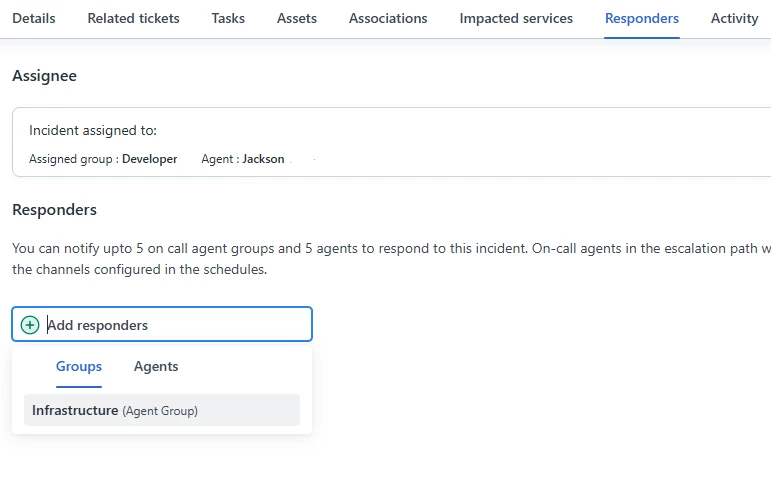
How do you designate which agent groups appear in this Responder Group drop down?  The only one that appears there for us in the Infrastructure Group.


Best answer by adityalamghare

Yes all the groups that have an on-call schedules created for them in the workspace will appear hear

7 replies

Forum|alt.badge.img+4
  • Community Debut
  • July 2, 2025

Haven’t done it myself but based on the text underneath the “Responders” header, i’m guessing it’s to do with the “On-Call Schedules” in the Workspace’s settings


adityalamghare
Forum|alt.badge.img+5

Yes all the groups that have an on-call schedules created for them in the workspace will appear hear


Forum|alt.badge.img+5
  • Author
  • Skilled Expert
  • July 9, 2025

Where do I designate an “on call schedule”?  Here?  


Forum|alt.badge.img+5
  • Author
  • Skilled Expert
  • July 9, 2025

Ignore my last question, I found where I create the on-call schedule.  


adityalamghare
Forum|alt.badge.img+5

Great, let me know if you need any help with on-call management. Will be happy to help!


annnlee
Contributor
Forum|alt.badge.img
  • Contributor
  • July 12, 2025

I had the same issue where only one group was showing in the Responder Group dropdown—in my case, it was just the Infrastructure group. What worked for me was going to Admin > Agent Groups and checking the settings for each group. I made sure they were either assigned to the right product or marked as “Visible to all agents.” Once I updated those settings, the other groups started showing up in the dropdown. I also double-checked that the agents in those groups had the right roles and permissions. After that, everything worked as expected.


Ayeshaarian87585
Apprentice
Forum|alt.badge.img

The agent groups that appear in the Responder Group dropdown are usually configured based on your system’s permission settings and group assignments—kind of like how Picasso carefully curated his palette to include only the colors he wanted in each piece.

I’d recommend checking your user roles and group visibility settings in the admin console to ensure the right groups are assigned to your profile or team. Sometimes only the Infrastructure Group shows up if others aren’t properly linked or don’t have the necessary permissions.