Question

How to change the language of freshchat dynamically (on the fly)?

  • January 27, 2025
  • 4 replies
  • 195 views

evgen12
Apprentice
Forum|alt.badge.img

in order to set the language of freshchat during initialization, it is enough to specify

<script> window.fcWidgetMessengerConfig = { locale: "fr" } </script>


The documentation (https://developers.freshchat.com/web-sdk/v2/#multi-lang) says that in order to change the language dynamically, you should call

window.fcWidget.user.setLocale('en')


But when I do this, nothing happens. In the browser console, you can see that the function is called, but the chat does not change the language.
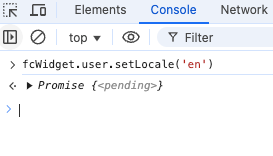
How to change the language correctly?


4 replies

Aparna-narayanan
Community Debut
Forum|alt.badge.img

hi ​@evgen12 


To change the locale and reinitiate the widget with the selected locale, please try this shared script. I have added list of languages to a dropdown and on selection will destroy any widget instance previous initialized and will reinitialize the widget with the selected language.


<b> Choose language </b>
<select id = "myLang" onchange = "myLang()">
<option> ---Languages-- </option>
<option> en </option>
<option> de </option>
<option> es </option>

</select>
<script>

let lang_selected;

function initWidget(lang_selected = 'en'){
window.fcWidgetMessengerConfig = {
locale: lang_selected,
}

var freshchatScript = document.createElement('script');
freshchatScript.src = '//fw-cdn.com/*******.js'; // add the unified js here
freshchatScript.setAttribute('chat', 'true');
//freshchatScript.setAttribute('widgetId', 'widgetUUId from the settings');
freshchatScript.id = 'freshchatScript'; // Assign an id to the script
// Append the script to the head of the document
var head = document.head || document.getElementsByTagName('head')[0];
head.insertBefore(freshchatScript, head.firstChild);
}
function myLang() {
lang_selected = document.getElementById("myLang").value;

console.log(" the lang selected is ==> "+lang_selected);
if (window.fcWidget?.isInitialized() == true) {
console.log('Widget already initialised');
window.fcWidget.user.isExists().then(function(data) {
console.log('User data', data);
if(data.data && data.success){
window.fcWidget.user.clear();
console.log('cleared');
} else {
console.log('user doesnt exist');
window.fcWidget.destroy();
}
}, function() {
console.log("Error fetching user");
});
window.fcWidget.on("user:cleared", function() {
// do some cleanup after user cleared
window.fcWidget.destroy();
});
window.fcWidget.on("widget:destroyed", function() {
console.log('After widget destroyed');
initWidget(lang_selected);
});

}
else {
console.log('Widget Not Initialised');
initWidget(lang_selected);
//Do Something Else
}
}
initWidget(lang_selected);
</script>


Let me know if works for u.


Thanks!


Hammad
Contributor
Forum|alt.badge.img
  • Contributor
  • January 1, 2026

Hi @evgen12 any success related to dynamic lang change?


  • Community Debut
  • January 15, 2026

I ran into the same issue before. In my case, setLocale only worked after the widget was fully loaded, and sometimes it required a widget refresh or re-init to apply the new language. Also worth double-checking that the locale you’re switching to is enabled in Freshchat. Freshchat’s docs are a bit unclear on this part.


Hammad
Contributor
Forum|alt.badge.img
  • Contributor
  • January 19, 2026

@sarawilliams locales are enabled in freshchat. Also I tried multiple things but for proper language switcher we do need to re-init the widget. There should be something that should work directly.