New Idea

Ability to export Knowledge Base (Solutions) Documents as a PDF

Related products:Freshdesk
  • December 26, 2012
  • 43 replies
  • 455 views

Hello,

I think the ability for a client to export (into a PDF) information (/articles) contained in the 'Solutions' section woud be a great feature. 

Functionality

Allow a user to create a downloadable PDF of content contained within the 'Solutions' section of Freshdesk.

  1. Users clicks on Create PDF button
  2. The user can select which sections of the Knowledge Base they would like to have included in the PDF. 
    1. The selection process can mirror the 3 level hierarchy already established in the platform. 
  3. The PDF is downloaded directly to the users computer or an email is sent to the user containing the PDF. 

Example

A great example of a company that has this type of feature is HelpIQ (link)

Business Application

A good example of why this feature would be useful is if a client only needs to access (/learn) about certain parts of the platform. They could create a PDF that contains only the information they need to review. Several of our larger clients like having the ability to export as a PDF because they prefer print versions of the Knowledge base documentation. 


Thanks!

43 replies

  • Contributor
  • September 10, 2014

This is good for clients that do not have internet access from the enterprise network so they can have access for the KB 


We are having to copy the whole article and then save as a separate downloadable file. Its a pain. This feature will save a lot of time and resource, and will be good as @Yishaisays for offline KB access.


Any further on with this one?


sajesh.krishnadas
Contributor
Forum|alt.badge.img+6

Now we have the option to export/print Knowledge Base articles as PDF with 'Print this Article' option. 


Regards,

Sajesh


  • Community Debut
  • November 7, 2014

Where is the PDF option?  When I click on the Print this article button I only see the option to print to a physical printer.  


Joe, that was exactly my thought.  This needs to SAVE TO PDF, not just a button that produces a page that's optimised for print.


sajesh.krishnadas
Contributor
Forum|alt.badge.img+6

Joe/Bradley,


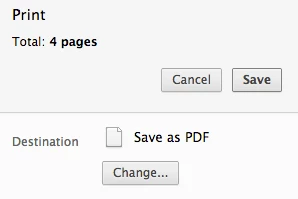
It is primarily the print function which has been added but the 'Save as PDF' option will be available as one of the printer destination option in Google Chrome browser (as shown below).


For other browsers, there are certain third-party software which can be installed to save as pdf directly - suggesting just a workaround option here. However, we will definitely look into the option to directly save the articles to PDF. Meanwhile, it would be great if you can share any particular use-case for saving the articles to PDF.


Thanks for your feedback.


Regards,

Sajesh


One use will be to email the solution to customers.  It is not always appropriate to send them the link to the solution.


Is there any way of customising the print layout from our end?  I.e., could this be customisable from Admin > Helpdesk Rebranding > Customise Portal ?


  • Contributor
  • November 17, 2014

Is there a way to export a whole category of solution's to PDF? (moved from another thread)


The use case is that we have an operations manual input as individual solutions into the system under an Operations Manual category. 

If we can export a whole category that would solve a HUGE problem, where we are currently having to duplicate efforts, by having a separate copy of the ops manual on cloud storage and link to it. The problems from that are having to sync both the solution based manual and the word/pdf doc version stored on cloud storage. 


Also, is there a way to print a whole category of content? Another hurdle we are struggling with in FreshDesk. I think if we can solve the export whole category to pdf, it would solve the print issue as well.


sajesh.krishnadas
Contributor
Forum|alt.badge.img+6

Bradley,

We thought the PDF export option isn't used commonly because it will be a static copy of the solution as it will not be updated when those solutions are updated online unlike the links. However, as mentioned earlier the 'Save as PDF' option will be available on the chrome browser as a workaround, kindly let us know whether it is helpful. Thanks :)


Josh,

We would like to understand your use case better on why do you have to store a copy of the manuals on your cloud storage and generate link to it when you already have them online on the portal. Are you looking forward to import your word/pdf into the portal?


  • Contributor
  • November 18, 2014

We worked out an alternate solution that doesn't require assistance from your team. Disregard.

Thanks.


  • Contributor
  • November 18, 2014

But if there is a way to import word/pdf files, that would be awesome.


I would be interested to hear Josh's solution if he was willing to share.


A large part of our kbase is actually a technical glossary (you will see that we have multiple products on our plan, one at glossary.domain.com.  It would be useful for users to be able to download the complete glossary in one go.


  • Contributor
  • November 19, 2014

Not so much a solution I'm afraid, as it is just a work around - changing the way we function/training users differently that doesn't require us to print it out in whole. Sorry.


  • Contributor
  • November 19, 2014

Sorry, I just noticed I didn't answer this here:
"why do you have to store a copy of the manuals on your cloud storage and generate link to it"


The reason was because there is no way to print out the manual easily. So we put it into a one big PDF so it can be printed out in hardcopy by store managers for new employees who may not have easy access to a computer or internet at home.


  • Community Debut
  • March 6, 2015

It's been two years since this was last suggested and it is surprising that such a feature has not been built.


We have been keying in all our knowledge base articles directly into Freshdesk. We have no issues with this.


However, when it comes to exporting this data out so that we can create hardcopy manuals for our clients it has been a pain. We have to go to each solution and copy the details out manually one by one. Is there a better way to this is?


  • Community Debut
  • March 7, 2015

Update!


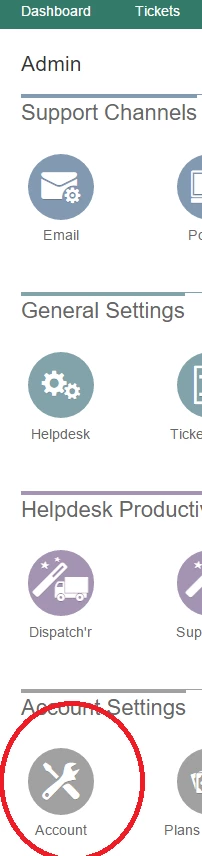
You can go to Admin->Accounts and choose the export option that is present. Once you do that, you will be provided with the account export, which would contain solutions along with the tickets, customers, etc.


  • Contributor
  • December 15, 2015

I dont see an Accounts section, did this change to a new area?


  • Contributor
  • December 16, 2015

@mw


  • Community Debut
  • July 26, 2016

I liked this funcionality!!


Thanks


  • Community Debut
  • July 26, 2016

Important implementation.


  • Community Debut
  • July 26, 2016

We need that feature urgentily!


sajesh.krishnadas
Contributor
Forum|alt.badge.img+6

As suggested by the community earlier, you can do a complete account export from Admin-> Account -> Export now under Export Data. The exported data will also contain Knowledge Base articles which can be used. 


  • Community Debut
  • January 8, 2017

Hi Sajesh,


I want to refresh your attention to this topic.


In principle I know the option of printing to a pdf, but what is much more important is to be able to customize the pdf to apply a proper branding, e.g add a company logo to the header for example.


The use case for doing this is that we use the knowledge base information also to distribute when we physically visit a customer, or for a new customer we sometimes prepare a usb with all the information he needs or like mentioned earlier in this topic sometimes in communication it is more appropriate to e-mail a pdf to a customer. Furthermore we have customers that due to safety reasons do not always have an internet connection so they have to print instructions on a pc with internet connections and then apply the instructions on the pc that is used to control our product.


The branding is important because we have a marketing strategy focussed on thought leadership. If people read thus "knowledge" e.g. a print-out from our knowledge base it should be associated with our brand. Also if another engineer reads it then the one that printed it he should associate the knowledge with our brand.


The customer nowadays expect information to be accessible through a multitude of distribution channels. So yes he expects a good online distribution channel, but he also expects the off-line channel (print) and the "pdf" channel to be still available. And for marketing it is important to offer the customer the same look and feel for each channel.


As an example for the functionality I am looking for see for example the link below. Also see the result when you press the pdf icon top-right:

https://success.mindtouch.com/Documentation/MindTouchResponsive/Content/Create_PDFs/Sample_PDF_styles/Customize_your_PDFs

(read also their use case in the introduction)


Of course by adding a proper export to pdf button, Freshdesk would increase my customer satisfaction! 


Regards,


Benny


We also have this use case. A customer is requesting a PDF of all knowledgebase articles for offline use, and also to have something to mark up & put post-it notes in. Other than going in page-by-page, what options do we have for something like this?