New Idea

Automatically insert canned response upon assigned ticket

Related products:Freshdesk
  • May 6, 2024
  • 10 replies
  • 85 views

Forum|alt.badge.img+6

Does anyone know how to create this automation? I would like when a ticket is assigned to an agent, it automatically replies with a personalized canned response ie. “Hi there, I have been assigned your ticket and am digging into the details. You should expect a reply from me shortly” - signed agent name. 

10 replies

Daniel Söderlund
Top Contributor ⭐
Forum|alt.badge.img+14

Don’t know any way to do it with canned response but you can use placeholders like in a canned response to use more personal message. But it will be the same for all. 


Forum|alt.badge.img+6
  • Author
  • Skilled Expert
  • May 6, 2024

Hi Daniel, thanks for the response. Do you know how you would trigger that? We have tickets automatically assign to agents and the only way I was able to make that happen would be if an agent manually assigned themself a ticket. 


Daniel Söderlund
Top Contributor ⭐
Forum|alt.badge.img+14

A new e-mail notification would be nice for this. 

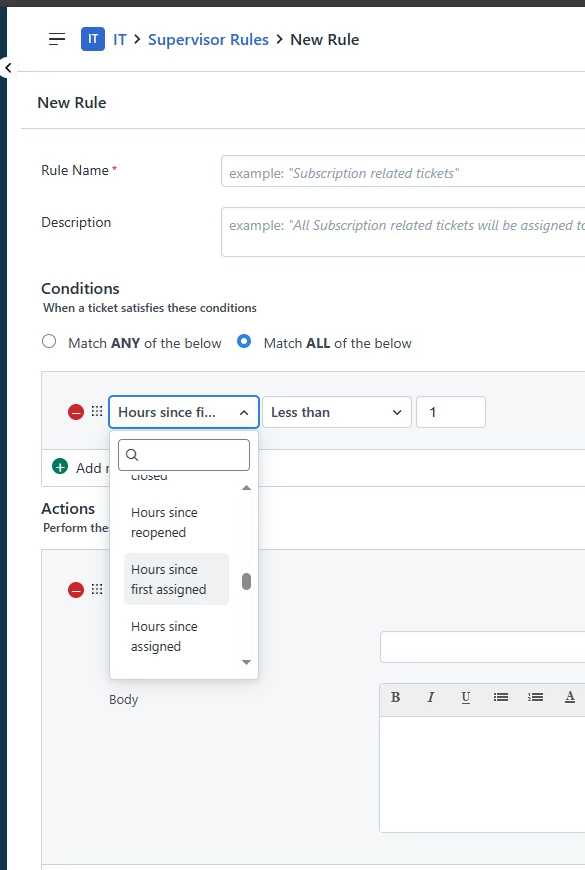
Until then this could maybe work. I would add a custom field or a custom Status (Assigned) so you don’t get loops. 
Extra Condition: Status Open  or Custom field(check box)  not true 
Action: Set status Assigned or Set custom field(check box)  = true


Forum|alt.badge.img+6
  • Author
  • Skilled Expert
  • May 6, 2024

That’s great, thank you. I wish you could use minutes since assigned, as the agent will probably respond within an hour. Is there a way to not send it if the agent has already responded?


Daniel Söderlund
Top Contributor ⭐
Forum|alt.badge.img+14

That’s great, thank you. I wish you could use minutes since assigned, as the agent will probably respond within an hour. Is there a way to not send it if the agent has already responded?

If you use a custom field you could set that using a workflow when the agent reply on the ticket. 


Thomas H
Top Contributor ⭐
Forum|alt.badge.img+2
  • Top Contributor ⭐
  • May 17, 2024

@mhall, @Daniel Söderlund - Are you talking about the same product?
The thread is for Freshdesk, Daniel’s screenshot is from Freshservice it seems.

But Freshdesk has pretty much the same options. And you don’t need to listen to any timebased values.
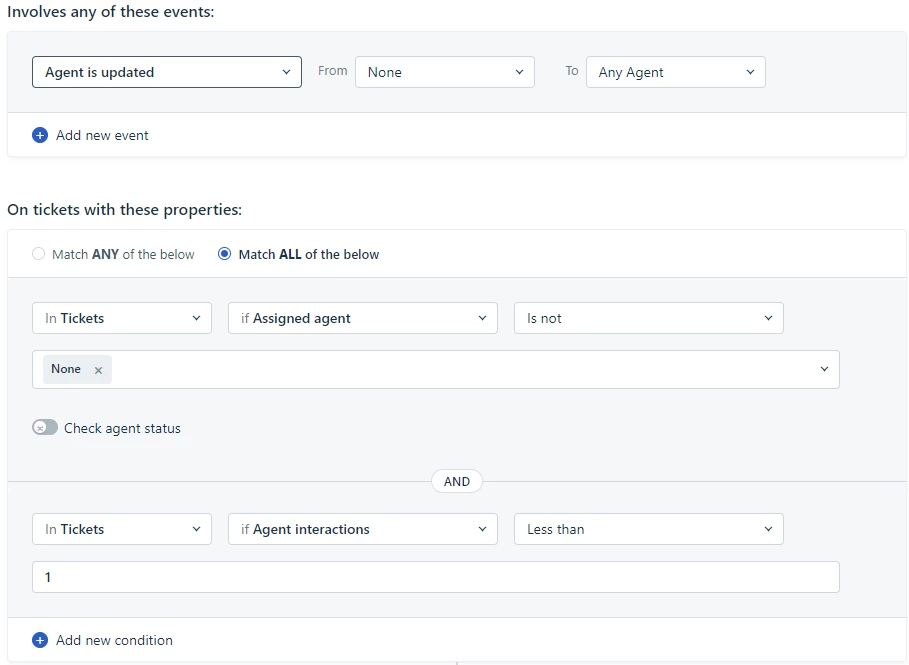
In Freshdesk you have the option to trigger an automation explicitly on agent update:


So you could send an email in the name of the agent every time the agent changes (which is not that often hopefully).

You could also go for that one:


So to send an email only if the ticket was not assigned to another agent before and only if there was no email reply from an agent before (agent interactions).


Daniel Söderlund
Top Contributor ⭐
Forum|alt.badge.img+14

@Thomas H  I see it now thanks for that heads up 


Forum|alt.badge.img+6
  • Author
  • Skilled Expert
  • May 17, 2024

@mhall@Daniel Söderlund - Are you talking about the same product?
The thread is for Freshdesk, Daniel’s screenshot is from Freshservice it seems.

But Freshdesk has pretty much the same options. And you don’t need to listen to any timebased values.
In Freshdesk you have the option to trigger an automation explicitly on agent update:


So you could send an email in the name of the agent every time the agent changes (which is not that often hopefully).

You could also go for that one:


So to send an email only if the ticket was not assigned to another agent before and only if there was no email reply from an agent before (agent interactions).


We use automatic ticket assignment, so the system assign it to an agent. That rule only works if the agent manually takes the ticket.


Thomas H
Top Contributor ⭐
Forum|alt.badge.img+2
  • Top Contributor ⭐
  • May 17, 2024

Oh yes - That’s true, what a shame.
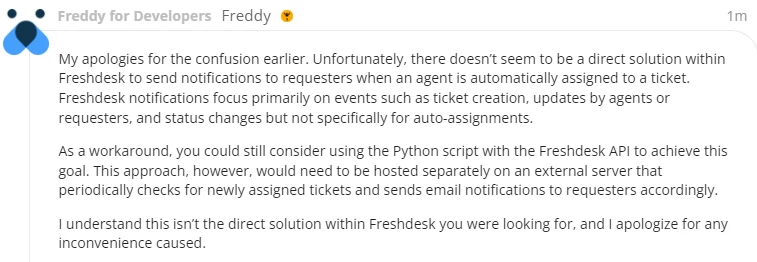
I also asked Freddy - Also clueless:


A solution would be to use an app to check for agent updates. I am pretty sure that the onTicketUpdate event triggers on auto-assignment aswell.
But that means, you’d need someone to implement a custom app.
I was already searching at the marketplace but there is no app for that (at least I did not find any).


kpatterson
Top Contributor ⭐
Forum|alt.badge.img+8
  • Top Contributor ⭐
  • May 24, 2024

At least in Freshservice, this could be achieved with a workflow triggered by “ticket updated” and “agent changes from none to any.”  However, if you have an SLA for first response, messages sent via workflow don’t count towards the first response so the agent would still need to send a manual reply.  Also, messages sent via workflow don’t actually appear in the chat log on the ticket so you kinda of have to take on faith that the message sent says what you want it to.