Open : Open for Consideration

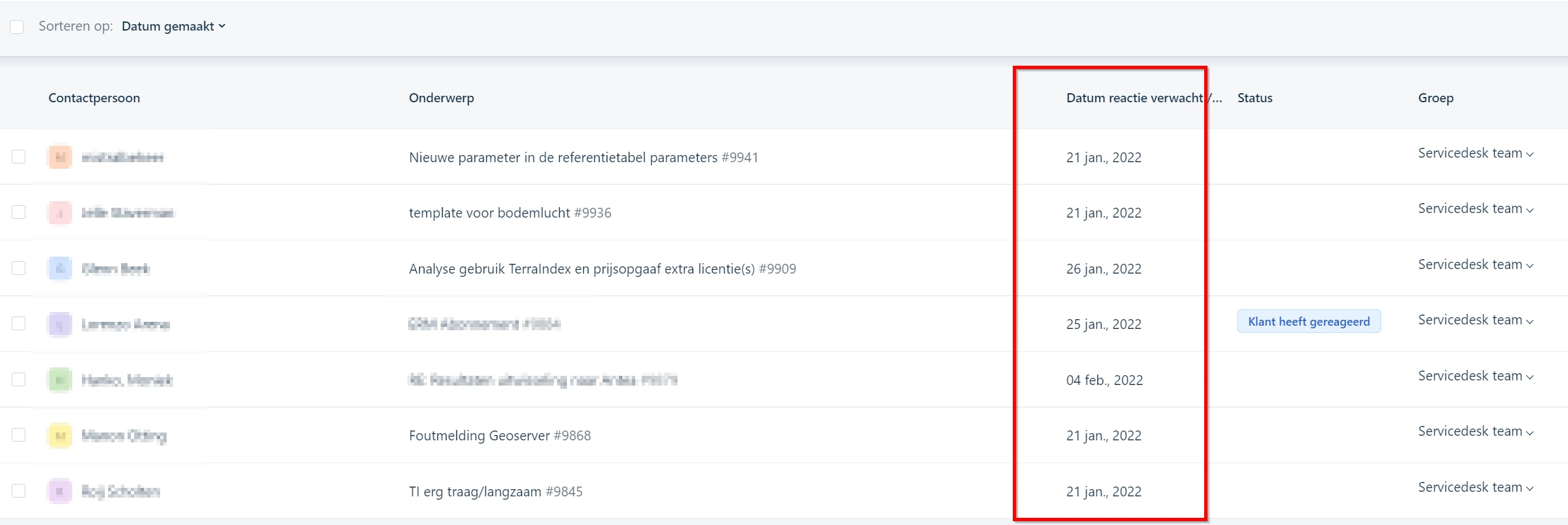
Being able to sort on all columns in Tickets table view

Related products:Freshdesk
  • January 20, 2022
  • 35 replies
  • 878 views

Show first post

35 replies

durga.sundaram
Community Manager
Forum|alt.badge.img+3
  • Community Manager
  • September 30, 2025
In progress : Included in Product RoadmapOpen : Open for Consideration
 

Hello from Freshworks! Apologies for the delay in updating this thread.

What we've shipped so far:

  • Sorting is available for some default fields, as well as custom dropdown, number, and text fields.

  • These columns can be sorted in ascending or descending order.

  • Tickets within a page (30/60/100) are sorted accordingly.

What's not possible yet:

  1. Sorting based on date or dependent fields.

  2. Sorting all tickets applicable to a view across all pages.

  3. Saving a view based on how a column is sorted.

We plan to address these gaps in the long term, but don’t have an ETA at the moment. We’re reopening this Idea—please keep the feedback coming. Thanks!


Forum|alt.badge.img+11
  • Top Contributor ⭐
  • September 30, 2025

This really is basic stuff.

3 years since the idea was pitched, 200+ upvotes, but still no development.  It’s really disappointing.  FreshWorks need to make use of these community ideas otherwise the userbase will just stop submitting  them (and yes, I have said this to various people at Fresh too).

For it to be removed from the roadmap, is incredibly disappointing.


mford_gd
Top Contributor ⭐
Forum|alt.badge.img+4
  • Top Contributor ⭐
  • September 30, 2025

I echo the sentiment of RobCrossHM that we have waited three years for minor modification to viewability and sort ability of multiple fields with multiple Views from Tickets, to Solution Articles, to Contracts.

To this day we still cannot sort a Solution Article by the Title...by the Title. That is really not acceptable. And please don’t get me started about Contract views.  The default is always set to ACTIVE so you have to clear that field to view all Contracts. Worse, is not being able to sort by Renewal Status - even though there is a column showing the status, so you are forced to to scroll page by page to find any in Renewal. 

I know AI was important to Freshservice, but what is important to us is the making Freshservice easy to use for us humans.


MParlett34
Community Debut
  • Community Debut
  • October 22, 2025

Will tickets ever be able to be sorted by Assigned To?  It’s hard to use a techs workload on one page when all the tickets are jumbled.


Ellalily87
  • November 29, 2025

Hi, i am new one, please consider my practical guide, i hope must be fruitful

1. Hover Over the Column Header

Move your cursor over any column name (example: Priority, Status, Assigned To, Created Date, Last Updated).
Most systems automatically show a sort icon (↑ or ↓).

2. Click Once to Sort Ascending

For example:

  • Priority (Low → High)

  • Date (Oldest → Newest)

3. Click Again to Sort Descending

Reverses the order:

  • Priority (High → Low)

  • Date (Newest → Oldest)

4. Use Multi-Column Sorting (If Supported)

Some platforms also allow advanced sorting such as:

  • Sort by Priority first, then Status

  • Sort by Due Date and then Assignee

This is usually done by holding Shift and clicking additional columns.

5. Customize Visible Columns

If sorting doesn’t appear on some fields, enable them first:

  • Go to Column Settings or Customize Table View

  • Check all columns you want to display

  • Apply changes → sorting becomes available

6. Save Your View for Future Use

Most ticket systems allow saving your sorted layout:

  • Click Save View / Save Filter

  • Give it a name like “High Priority First”

  • Next time, open the view in one click


Forum|alt.badge.img+9
  • Skilled Expert
  • November 30, 2025

Yes but the problem is, that not all column headers have this ability to sort:


You also cannot change what columns appear in what view and change the default columns that appear. It always resets back to its own default.


mford_gd
Top Contributor ⭐
Forum|alt.badge.img+4
  • Top Contributor ⭐
  • December 3, 2025

I think this tip is very nice Ellalily87 - however has Cara states many columns do have have the ability to sort at all.  A wee bit frustrating especially as many of us have asked to have this resolved for several years. One good example is the Title of Solution Articles...sorting alphabetically would really help find a article. 


Forum|alt.badge.img+9
  • Skilled Expert
  • December 3, 2025

I think this tip is very nice Ellalily87 - however as Cara states many columns do not have the ability to sort at all.  A wee bit frustrating especially as many of us have asked to have this resolved for several years. One good example is the Title of Solution Articles...sorting alphabetically would really help find a article. 


OMG yes! Especially seeming there is no filtered search or very little fields in an article you can filter on. Makes searching for specific details in an article rather difficult.


Solutions were definitely an afterthought. 


MitchNC
Community Debut
  • Community Debut
  • January 2, 2026

Hi Freshdesk support,

Can we please have a “new year” update on this.

In this modern fast moving landscape if you under develop your software then you expose yourself to “loyal” customers leaving for another company that does listen to their customer bases “wants and needs”. Food for thought don’t you think!

Come on, show us how great Freshdesk can be. 

Kind regards


AbominableSnowmin
Contributor
Forum|alt.badge.img+5

Looking forward to seeing this baseline functionality approved and added soon!