Closed for Voting

Can I assign a ticket to more than one agent?

Related products:Freshdesk
  • June 17, 2015
  • 5 replies
  • 45 views

I know I can switch views to see other agents tickets, but when sharing a task or project I would like to make the task visible to 2 or more members of the team, that way it is more visible to them ie shows up in their default view.

5 replies

Mark,

When you want more members to be involved in a ticket, you can add them as "watchers" by clicking on the star button. 


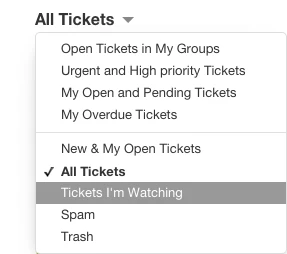
All watchers will be notified about new replies and notes in the tickets. Say, you add James as a watcher to a ticket, this ticket will show up in "Ticket's I'm Watching" view for James. This way, he'll be able to keep track of the shared project. 


Does this help, Mark ?


  • Contributor
  • March 18, 2018

I have a question on this:


If Agent A needs to forward a ticket to Agent B, does agent A need to set the ticket to be watched by themselves in order to keep up to date on the ticket, like SLAs, pending actions, etc.?


aravind.sundararajan
Skilled Expert
Forum|alt.badge.img+12

Hello Rick,


Any one can list an agent as a watcher on the ticket in order to provide them real-time updates on what's happening on the ticket. We also have a marketplace app (Shared ownership) that allows you to share tickets between two agents - Customer facing and an internal agent. 


Cheers!


  • Contributor
  • November 14, 2019

I was unable to find a shared ownership app, but we need this ability as well to be able to flag watched tickets with "my" tickets.


Hello Kevin,


Shared Ownership is feature that is a part of Advanced Ticketing available from the Estate plan onwards. You may read about it in this article - https://support.freshdesk.com/support/solutions/articles/224194-enabling-shared-ownership


Feel free to contact support@freshdesk.com if you have any issues configuring this if you are on the Estate plan already.


Cheers!