New Idea

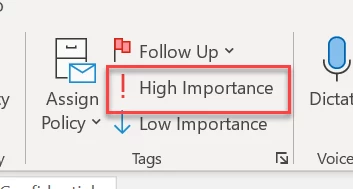
Mark high important emails as urgent

Related products:Freshdesk
  • January 20, 2023
  • 7 replies
  • 316 views

Forum|alt.badge.img+1

When an email is marked as high importance in Outlook that should carry over to Freshdesk and mark the ticket as urgent. 


7 replies

  • Community Debut
  • March 10, 2023

Yes!! Really looking for a feature like this. At the moment a workaround is by letting the customer add “Urgent” in front of the subject line and making the automator to work with it. But this is not looking professional. Why is a simple thing like this nog intergrated yet?


Forum|alt.badge.img+6
  • Skilled Expert
  • March 31, 2023

This 100% needs adding, same problem


Brynn
Apprentice
Forum|alt.badge.img
  • Apprentice
  • September 4, 2024

I was literally typing a feature request for this. Please push this one through :)


Leighanne
Skilled Expert
Forum|alt.badge.img+3
  • Skilled Expert
  • March 14, 2025

Commenting to try and bring attention to this (also upvoted). This is a necessary update that has been requested over two years ago at this point.

If Agents have no access to the inbox, working solely out of Fresh Service as intended, they have no other way to know if the email was sent with high priority through no fault of their own. 

Please implement this 😀


Forum|alt.badge.img
  • Community Debut
  • June 29, 2026

We just implemented freshdesk for our customer service team.

There request is legit - to be able to indicate that certain emails are urgent - like when we need clearance documents or delivery details or order confirmations to meet tight deadlines.


Daniel Söderlund
Top Contributor ⭐
Forum|alt.badge.img+14

We just implemented freshdesk for our customer service team.

There request is legit - to be able to indicate that certain emails are urgent - like when we need clearance documents or delivery details or order confirmations to meet tight deadlines.

Well it’s how you use SLA but I haven’t seen any way to set it based on the incoming priority. 


Forum|alt.badge.img
  • Community Debut
  • June 30, 2026

We just implemented freshdesk for our customer service team.

There request is legit - to be able to indicate that certain emails are urgent - like when we need clearance documents or delivery details or order confirmations to meet tight deadlines.

Well it’s how you use SLA but I haven’t seen any way to set it based on the incoming priority. 

we would also like to mark outgoing emails with high importance.

Exposing email header data (only the relavent ones) in a structured way would significantly expand automation possibilities for both inbound and outbound email communications.