Solved

cross-origin With My React App

  • August 18, 2024
  • 2 replies
  • 137 views

Hegery
Apprentice

Hi,

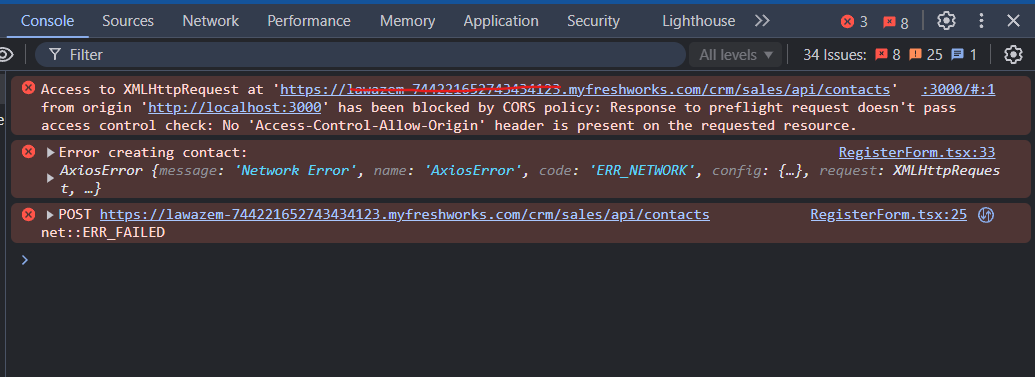
We are unable to create contact using APIs on a react js application. We are facing the CORS policy blocking issue.
 

Please help us to fix the below error.


API URL:
'https://lawazem-744221652743434123.myfreshworks.com/crm/sales/api/contacts'

METHOD:
post

​​​​​​​

Best answer by pradipta.chandra

Hi Hegery.


Thank you for reaching out to us. I am Pradipta, from the Freshsales team.

As per CORS policy, no websites can directly use our API from their front end. This is the expected behaviour as per our security measures and it is a policy that is applied on your website.
Since you are trying to create a contact from your website, we suggest 2 solutions that you can use:

  1. Invoking CRM api from your proxy server/middleware. This will avoid this issue as CORS issue will occur only if you try to access the APIs directly from your frontend. You can fix the issue by following the steps mentioned in the following articles:
    https://developer.mozilla.org/en-US/docs/Glossary/CORS
    https://developer.mozilla.org/en-US/docs/Web/HTTP/CORS/Errors/CORSMissingAllowOrigin

  2. You can also make use of CRM tracking code feature.

Please feel free to let us know if you need any further assistance or drop us an email to crm-support@freshworks.com.

2 replies

eeha0120
Top Contributor ⭐
Forum|alt.badge.img+12
  • Top Contributor ⭐
  • August 19, 2024

Hi.

I’d suggest to submit this in the Developers Community instead:

Freshworks Developer Community


On the other hand, this was posted on FreshDesk community but flagged as FreshSales, and according to your API URL, it seems it is indeed FreshSales.

Tagging @alyssia.correa @Kamakshi V just in case.


Regards,


pradipta.chandra
Community Manager
Forum|alt.badge.img+8

Hi Hegery.


Thank you for reaching out to us. I am Pradipta, from the Freshsales team.

As per CORS policy, no websites can directly use our API from their front end. This is the expected behaviour as per our security measures and it is a policy that is applied on your website.
Since you are trying to create a contact from your website, we suggest 2 solutions that you can use:

  1. Invoking CRM api from your proxy server/middleware. This will avoid this issue as CORS issue will occur only if you try to access the APIs directly from your frontend. You can fix the issue by following the steps mentioned in the following articles:
    https://developer.mozilla.org/en-US/docs/Glossary/CORS
    https://developer.mozilla.org/en-US/docs/Web/HTTP/CORS/Errors/CORSMissingAllowOrigin

  2. You can also make use of CRM tracking code feature.

Please feel free to let us know if you need any further assistance or drop us an email to crm-support@freshworks.com.