


Answer

Change default text when replying to a ticket

  • December 9, 2024
  • 2 replies
  • 108 views

Forum|alt.badge.img

Hi,

Is there any way of changing the default text when replying to a ticket to use the customers first name rather than their full name? i.e. I want to be able to have ‘Hi Chris’ displayed instead of ‘Hi Chris Gale’

I’ve looked in the portal pages setting but can’t see the template in there?

Thanks

Chris.
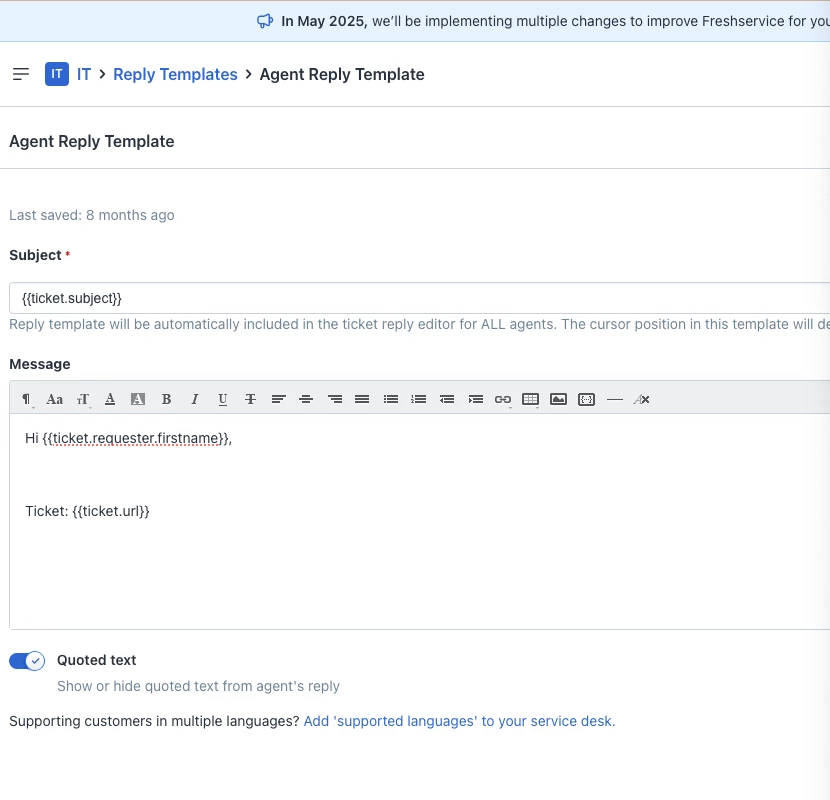
Best answer by Roxwell

Admin » Email Notifications » Agent Reply Template ;) 


Make sure you save it with the cursour in the right place.


2 replies

Roxwell
Top Contributor ⭐
Forum|alt.badge.img+9
  • Top Contributor ⭐
  • Answer
  • December 9, 2024

Admin » Email Notifications » Agent Reply Template ;) 


Make sure you save it with the cursour in the right place.


Forum|alt.badge.img
  • Author
  • Apprentice
  • December 9, 2024

Lol, thought it’d be in there somewhere! Be gentle - just replacing a 20 year old in-house system :)


