Question

Dynamically show or hide fields in a Service Item form

  • June 28, 2024
  • 5 replies
  • 109 views

Forum|alt.badge.img+2

Hi all

I’m trying to add some ‘dynamic’ questions to a Service Item form where the customer is asked whether they want ‘something’ to happen to a mobile phone, a laptop, neither or both.

If they select ‘mobile phone’, then a field should show asking for their mobile number.

If they select ‘laptop’ then they should be asked for their asset id.

If they select both, then both questions should be asked.

If the select ‘neither’ then they shouldn’t see the questions asking for either of these bits of information.


Is that possible currently please?

thanks

5 replies

Roxwell
Top Contributor ⭐
Forum|alt.badge.img+9
  • Top Contributor ⭐
  • June 28, 2024

Hey @AlexanderPaul 

You could do it with Dynamic Drop downs, or using Business rules for forms. Business rules for forms would probably be the best method.


I’ll make a little video to show you!


Forum|alt.badge.img+2
  • Author
  • Contributor
  • June 28, 2024

That would be great thanks...although please remember this is for SERVICE ITEM forms, and not ticket forms… :)


Forum|alt.badge.img+3
  • Skilled Expert
  • December 6, 2024

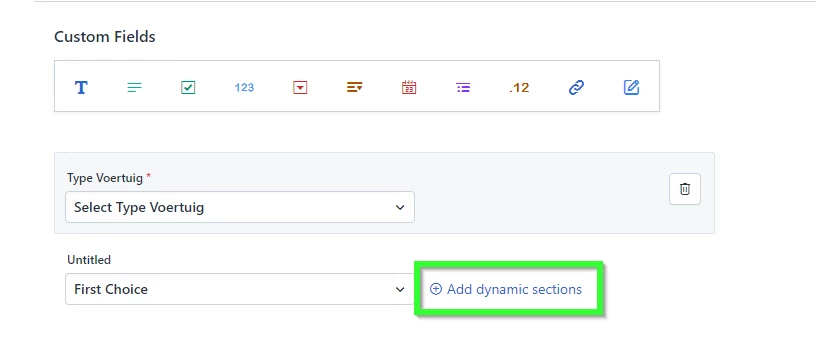
Also a limitation seems to be that you can’t do this visually if you use a custom object as datasource for your dropdown. You can then only use the Business Rules.

See my example below. The first dropdown has a custom object as datasource and there’s no option to “Add Dynamic Sections”. To the second dropdown I manually added some items and it does get the “Add dynamic sections” option. Which in my opinion is much easier to configure visually, but I don’t want to stop using my custom objects. I hope Freshservice adds this feature. 


Roxwell
Top Contributor ⭐
Forum|alt.badge.img+9
  • Top Contributor ⭐
  • December 9, 2024

That would be great thanks...although please remember this is for SERVICE ITEM forms, and not ticket forms… :)


Then use a Business rule, you can set those on a service item :D 


Forum|alt.badge.img+7
  • Top Contributor ⭐
  • December 10, 2024

What we did was we created the fields
 

Linked those to the category’s using a custom object and set up a workflow to sync the categorys from the agents to the ones from the users.
We also included auto assign to the right team so tickets get routed accordingly.