Question

Hide Service Categories

  • December 4, 2024
  • 7 replies
  • 125 views

IT Amanda
Apprentice
Forum|alt.badge.img

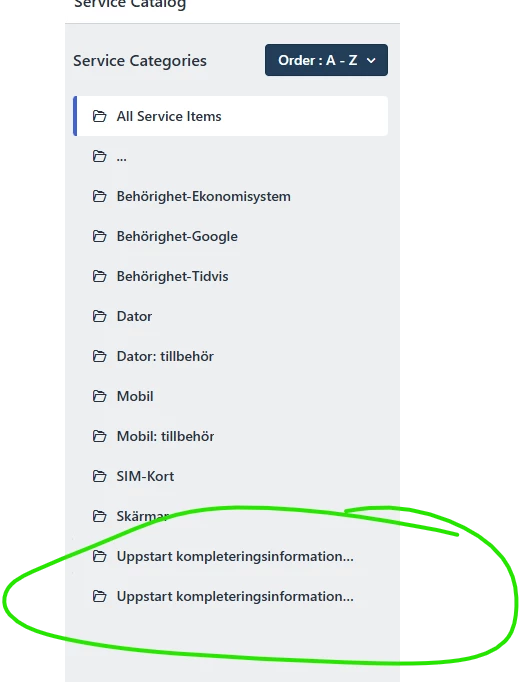
I want to hide service catalogs from requesters. How do i hide them so when you go to order you cant see them in the portal.

 

7 replies

DanielRuff
Top Contributor ⭐
Forum|alt.badge.img+9
  • Top Contributor ⭐
  • December 4, 2024

Requesters cannot see the category when this category only contains service requests that they cannot see. So create an empty requestor group and change the visibility for all service catalog items within that category to that empty group. 


IT Amanda
Apprentice
Forum|alt.badge.img
  • Author
  • Apprentice
  • December 4, 2024

Requesters cannot see the category when this category only contains service requests that they cannot see. So create an empty requestor group and change the visibility for all service catalog items within that category to that empty group. 

And if i want them to se the items in the onboarding kit but not in the service catalog?


DanielRuff
Top Contributor ⭐
Forum|alt.badge.img+9
  • Top Contributor ⭐
  • December 4, 2024

I’m sorry I cannot tell you as we don’t use the onboarding module. Hope someone else can answer that.


Daniel Söderlund
Top Contributor ⭐
Forum|alt.badge.img+14

Hello, 

You need to use CSS/Java script to do it. 


ITMike
Top Contributor ⭐
Forum|alt.badge.img+9
  • Top Contributor ⭐
  • December 4, 2024

@IT Amanda this article will help you hide the offboarding module or any other buttons in the menus you just have to adapt it to the button.

Customise menu on portal to remove service | Freshworks Community


Roxwell
Top Contributor ⭐
Forum|alt.badge.img+9
  • Top Contributor ⭐
  • December 4, 2024

@IT Amanda this article will help you hide the offboarding module or any other buttons in the menus you just have to adapt it to the button.

Customise menu on portal to remove service | Freshworks Community

OOO  that’s smooth 🤓


Prasanth Sampathkumar
Community Debut
Forum|alt.badge.img+3

Hi ​@IT Amanda,

To hide specific service catalog items from requesters, follow these steps:

1. Go to Admin > Service Management > Service Catalog in your Freshservice account.

2. Select the required service item that you want to hide.

3. Navigate to the Settings tab within the service item.

4. Under "Choose who can view this service item," configure visibility by selecting specific requester groups or individuals who should have access. If no groups or individuals are selected, the item will not be visible to anyone except agents.

To ensure requesters can view only the onboarding kit items but not the entire service catalog:

1. Group all onboarding-related items into a specific category or requester group.


2. For each onboarding kit item in the service catalog, repeat the steps above to grant access to the requesters you want to be able to view these items.

3. Do not provide visibility for other general service catalog items for the same users.

This will allow specific users to see the onboarding items but keep other service catalog items hidden from them.