
Question

How do I give agents access to see the requestor's details?

  • March 12, 2025
  • 5 replies
  • 63 views

MihaelaBKA
Apprentice

Hi everyone,

I’ve been using FreshService for over 2 years now and I always thought this functionality is out of the box and all of my agents can see the details of our requestors when hovering the mouse over their requestors’ names, under the subject of the ticket:
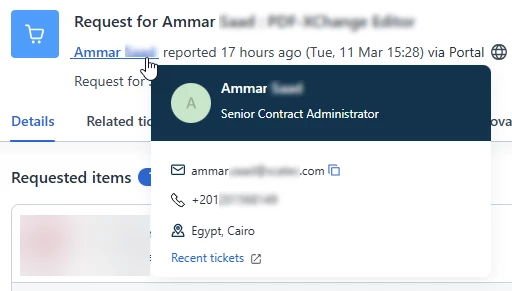
Apparently none of my agents can gather the user information like me, and the name of the requestor for them is written in black not in blue, and it’s also not linked to the user’s profile in FreshService.

Does anyone know what role they need, or how I can open this functionality for all of my agents? I am an administrator in FreshService, so I am used to having more access than them, but I don’t see why this feature would be restricted for them and how to give them access to this box without promoting them all as administrators :)

Your support is appreciated! Thank you all! 

5 replies

Roxwell
Top Contributor ⭐
Forum|alt.badge.img+9
  • Top Contributor ⭐
  • March 12, 2025

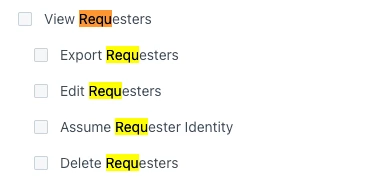
It’s an admin role (Weird I know), which means assuming an agent’s Identity is an issue. Screen shot below


ITMike
Top Contributor ⭐
Forum|alt.badge.img+9
  • Top Contributor ⭐
  • March 12, 2025

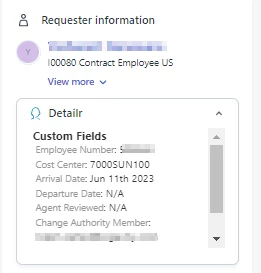
We also use a FS app called detailr it gives you a quick view and you can select what it shows including custom fields you have created.  


Tabitha
Top Contributor ⭐
Forum|alt.badge.img+4
  • Top Contributor ⭐
  • March 12, 2025

We chose to create a custom admin role that allows the user to see the requester and department details. But we also let people use the scenario automation, canned responses, and status pages so they needed admin access anyway. This does impact the ability to impersonate, but that was a fair trade off.


ITMike
Top Contributor ⭐
Forum|alt.badge.img+9
  • Top Contributor ⭐
  • March 13, 2025

@Tabitha I believe with the new admin role breakdowns you can add/remove the Impersonate ability as a standalone feature.


Tabitha
Top Contributor ⭐
Forum|alt.badge.img+4
  • Top Contributor ⭐
  • March 13, 2025

@Tabitha I believe with the new admin role breakdowns you can add/remove the Impersonate ability as a standalone feature.


I may need to report a bug then 😁
I have granted the admins the ability to impersonate people, but some agents cannot be impersonated, and I thought it was related to granting them an admin role for departments and requesters… I will investigate further. Thanks!