Question

Script to re-open tickets with no notes

  • October 8, 2024
  • 2 replies
  • 20 views

Has anyone created a script to automatically re-open resolved or closed tickets when a Agent just closes or resolves tickets without putting in any notes in the ticket. I have a couple of Agents just closing or resolving tickets without posting any notes and the user’s are complaining that the work was not done. I have started to show users how to re-open tickets not to help.


Any ideas? If you have, care to share the script or report you created?

2 replies

Roxwell
Top Contributor ⭐
Forum|alt.badge.img+9
  • Top Contributor ⭐
  • October 9, 2024

The simplest way, is to add your own resolution notes field - (because the default one isn’t visible to the user), then use a business rule to make that field visible and mandatory when resolving the ticket. You can then add the note to the resolution email, using a placeholder. 

Then, the agent cannot resolve without a note, and the user can see the specific note intended to be about the resolution. 


ITMike
Top Contributor ⭐
Forum|alt.badge.img+9
  • Top Contributor ⭐
  • October 9, 2024

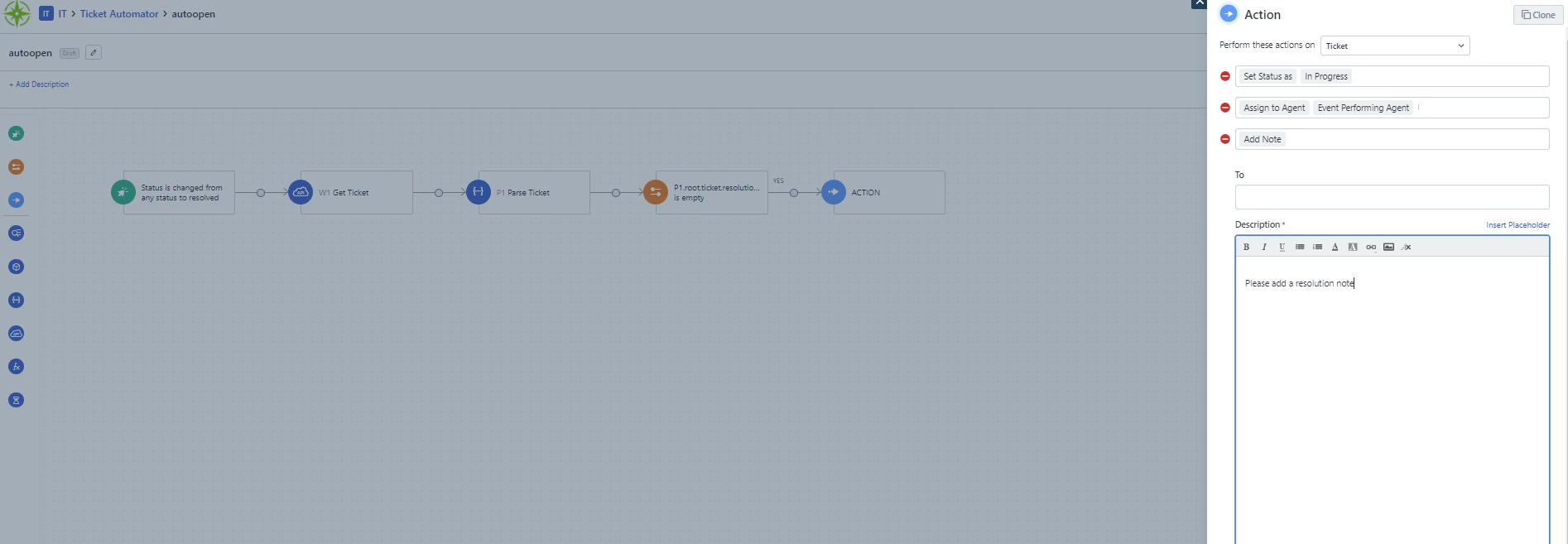
@JoeR I also do what @Roxwell suggested so that the user gets a resolution note, however, if you are only worried about the agent leaving a resolution note and not worried about the end user or don’t want to create a custom field for some reason you can make a workflow automator like below.  Use an api call to get the ticket info, parse it out and then use a conditional to see if a resolution note was left.  If not reopen the ticket, assign it to last tech and add a note.