Question

Simplified 'Search' field to assist Category/Sub-Category/Item fields for auto-population

  • June 16, 2025
  • 2 replies
  • 35 views

Forum|alt.badge.img+5

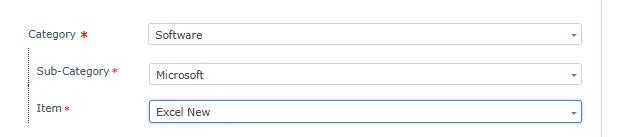
I have a question regarding the Freshservice portal for end users.  We have moved away from ‘Incident Categories’ and moved to the fields for Category/Sub-Category/Item.

Things are working well, but a few inquiries have have come about stating too many clicks and added time searching for items in three different fields to submit a ticket. 

Has Fresh thought about a generic ‘Search Field’ where a keyword is typed in and selected (pulling from the Category properties) that auto-populates the Category/Sub-Category/Item fields when a user finds what they are looking for? 

2 replies

Roxwell
Top Contributor ⭐
Forum|alt.badge.img+9
  • Top Contributor ⭐
  • June 17, 2025

You can search categories within the drop down. It’s not obvious saying “Search” but it does work :D 


Forum|alt.badge.img+5
  • Author
  • Skilled Expert
  • June 17, 2025

Understood, and appreciate the answer.  I should expand a little more. The ‘Search’ feature works without issue, what I’m curious about is we have 7 main ‘Categories’ with a multitude of ‘Sub-Categories’ and further ‘Items’ for those Sub-Categories. I was wondering if a ‘Search’ field could be used above the ‘Category’ field that would encompass all of the information from the Workspace to allow the user to type in ‘Excel’ and select the item they are looking for with some sort of ‘logic’ that would then fill in the Category, Sub-Category and Item fields for the user.


We used Incident Category prior to my arrival and while it was intuitive for the end user to select their ‘issue’, the list was ridiculously long. 

Thanks again.