Question

SLA policy for VIP users

  • August 16, 2022
  • 15 replies
  • 322 views

Forum|alt.badge.img+6

Hi,

How I can setup an SLA policy for VIP users?

Right now we have a SLA policy for every user but I can’t create another policy for VIP users.


Thank you so much if you know how ;)

15 replies

zachary.king
Top Contributor ⭐
Forum|alt.badge.img+16
  • Top Contributor ⭐
  • August 16, 2022

Hello @maxlehot1234 just for clarification, when you reference SLA policies for users, you mean VIP “Requesters”?


Forum|alt.badge.img+6
  • Author
  • Skilled Expert
  • August 16, 2022

Hello @maxlehot1234 just for clarification, when you reference SLA policies for users, you mean VIP “Requesters”?

All requesters are “normal” users.

Our VIP users have a crowd after their name and we call them VIP users.
We want a different SLA for them, because they are Directors and need a better attention as example


zachary.king
Top Contributor ⭐
Forum|alt.badge.img+16
  • Top Contributor ⭐
  • August 16, 2022

Hello @maxlehot1234 just for clarification, when you reference SLA policies for users, you mean VIP “Requesters”?

All requesters are “normal” users.

Our VIP users have a crowd after their name and we call them VIP users.
We want a different SLA for them, because they are Directors and need a better attention as example

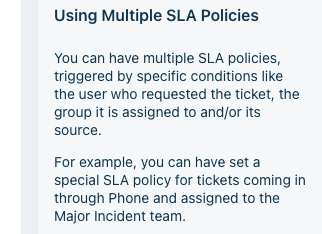
Gotcha, so your request is totally valid and is even indicated possible in the SLA Policy description found in the module itself.

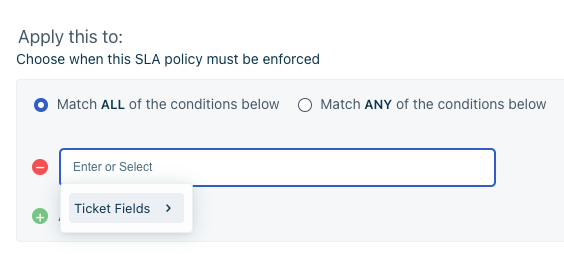
But as I am sure you have noticed you can only add conditionals to SLAs based on Ticket Fields and “Requester” is nowhere to be found in that list of fields. I have sent in a support ticket to figure out why this is. Will let you know what I find out. 

Workaround that might work: you can create a custom text field in your ticket form, hide the field from visibility using business rules. Then trigger a webhook using workflow automator to fill the field with the requester’s name. Then you can access that field in the ticket fields found in the conditionals of the SLA. From there try and build a conditional that allows the SLA to trigger based on the contents of that custom textbox. Not elegant but might work.

Take care!


Forum|alt.badge.img+6
  • Author
  • Skilled Expert
  • August 17, 2022

Hello @maxlehot1234 just for clarification, when you reference SLA policies for users, you mean VIP “Requesters”?

All requesters are “normal” users.

Our VIP users have a crowd after their name and we call them VIP users.
We want a different SLA for them, because they are Directors and need a better attention as example

Gotcha, so your request is totally valid and is even indicated possible in the SLA Policy description found in the module itself.

But as I am sure you have noticed you can only add conditionals to SLAs based on Ticket Fields and “Requester” is nowhere to be found in that list of fields. I have sent in a support ticket to figure out why this is. Will let you know what I find out. 

Workaround that might work: you can create a custom text field in your ticket form, hide the field from visibility using business rules. Then trigger a webhook using workflow automator to fill the field with the requester’s name. Then you can access that field in the ticket fields found in the conditionals of the SLA. From there try and build a conditional that allows the SLA to trigger based on the contents of that custom textbox. Not elegant but might work.

Take care!

Yeah I notice we can choose requesters, but in fact, the ioption is not there :(
It will be nice to have “VIP” users too in this filter ;)

Let’s see what Freshservice reply related to this issue.
I can contact them too for that, so they will see more users contact them for the same thing ahah


zachary.king
Top Contributor ⭐
Forum|alt.badge.img+16
  • Top Contributor ⭐
  • August 17, 2022

Hi @maxlehot1234 I got a response and their solution was just as I mentioned. To use an agent only visible custom field that indicates requester data, so that the custom field will be available in the SLA conditions.

They indicated that the language was misleading and they are fixing that issue and raising awareness to the need for requester details to be available in SLAs. We will have to wait and see what happens.


Forum|alt.badge.img+6
  • Author
  • Skilled Expert
  • August 17, 2022

Hi @maxlehot1234 I got a response and their solution was just as I mentioned. To use an agent only visible custom field that indicates requester data, so that the custom field will be available in the SLA conditions.

They indicated that the language was misleading and they are fixing that issue and raising awareness to the need for requester details to be available in SLAs. We will have to wait and see what happens.

Majority of our users create tickets from email, so I can’t add an hidden text field :(

I will wait.

Thank you


zachary.king
Top Contributor ⭐
Forum|alt.badge.img+16
  • Top Contributor ⭐
  • August 17, 2022

Hi @maxlehot1234 I got a response and their solution was just as I mentioned. To use an agent only visible custom field that indicates requester data, so that the custom field will be available in the SLA conditions.

They indicated that the language was misleading and they are fixing that issue and raising awareness to the need for requester details to be available in SLAs. We will have to wait and see what happens.

Majority of our users create tickets from email, so I can’t add an hidden text field :(

I will wait.

Thank you

Are the users submitting the emails the VIP users in freshservice? If so when the email comes in and the ticket is created you can have workflow automators run that grab the requester name or email and populate it in that custom form field that would be hidden from requester view. All the workflow cares about is if the ticket is created, doesn’t matter if the source is email unless you specify to ignore that source.


Forum|alt.badge.img+6
  • Author
  • Skilled Expert
  • August 17, 2022

Hi @maxlehot1234 I got a response and their solution was just as I mentioned. To use an agent only visible custom field that indicates requester data, so that the custom field will be available in the SLA conditions.

They indicated that the language was misleading and they are fixing that issue and raising awareness to the need for requester details to be available in SLAs. We will have to wait and see what happens.

Majority of our users create tickets from email, so I can’t add an hidden text field :(

I will wait.

Thank you

Are the users submitting the emails the VIP users in freshservice? If so when the email comes in and the ticket is created you can have workflow automators run that grab the requester name or email and populate it in that custom form field that would be hidden from requester view. All the workflow cares about is if the ticket is created, doesn’t matter if the source is email unless you specify to ignore that source.

Do you know how I can make this custom hidden field to be poupulate with the requester name?

I check the action, but nothing there.

Thank you for everything :)


zachary.king
Top Contributor ⭐
Forum|alt.badge.img+16
  • Top Contributor ⭐
  • August 17, 2022

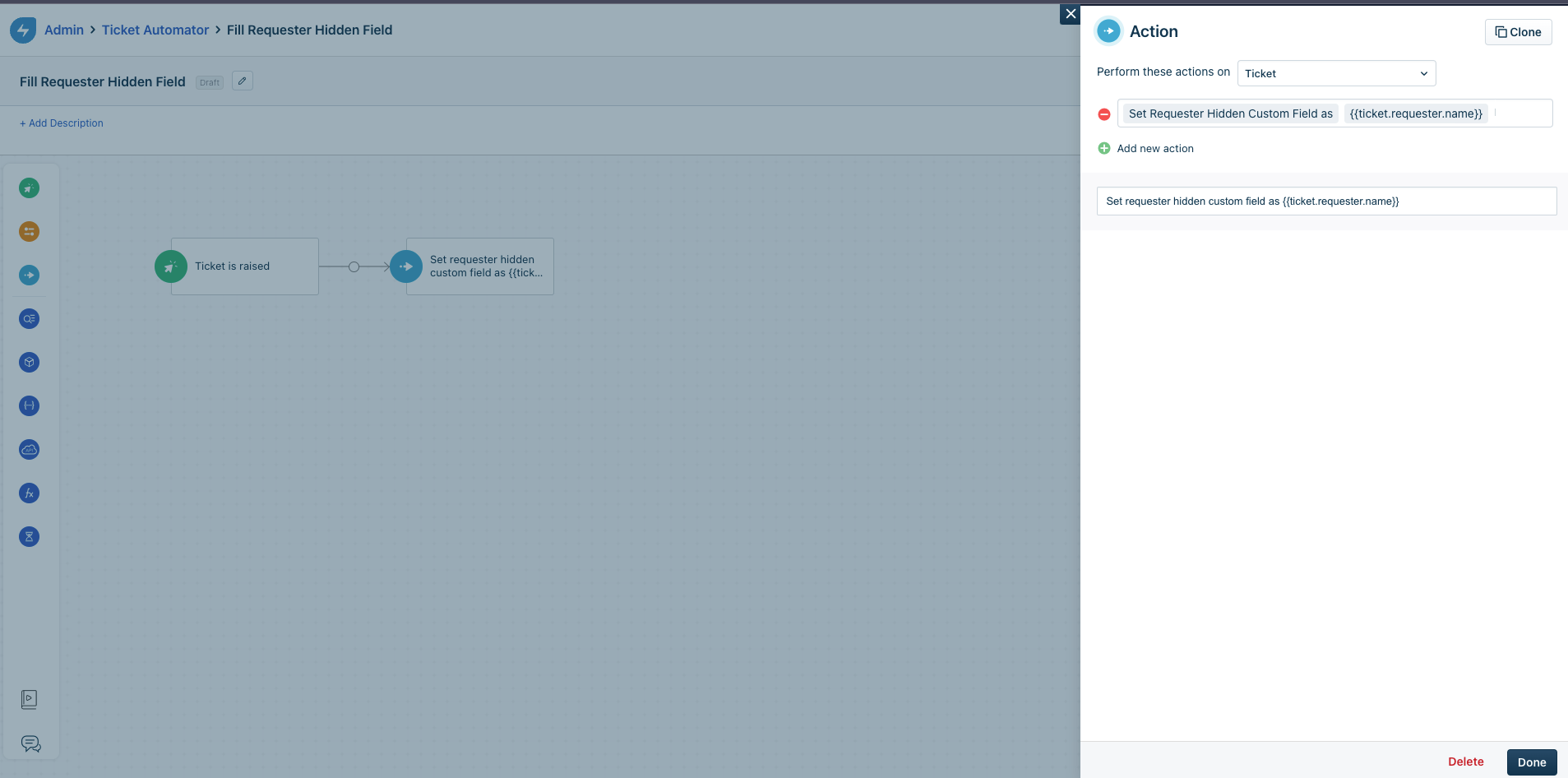
You first need to create the field under Form Fields > Ticket Forms. Then in Work Flow Automator you can set the action to “Set “field name here” as {{ticket.requester_name}}”. It will run when the ticket is raised and fill the field with the requester name.

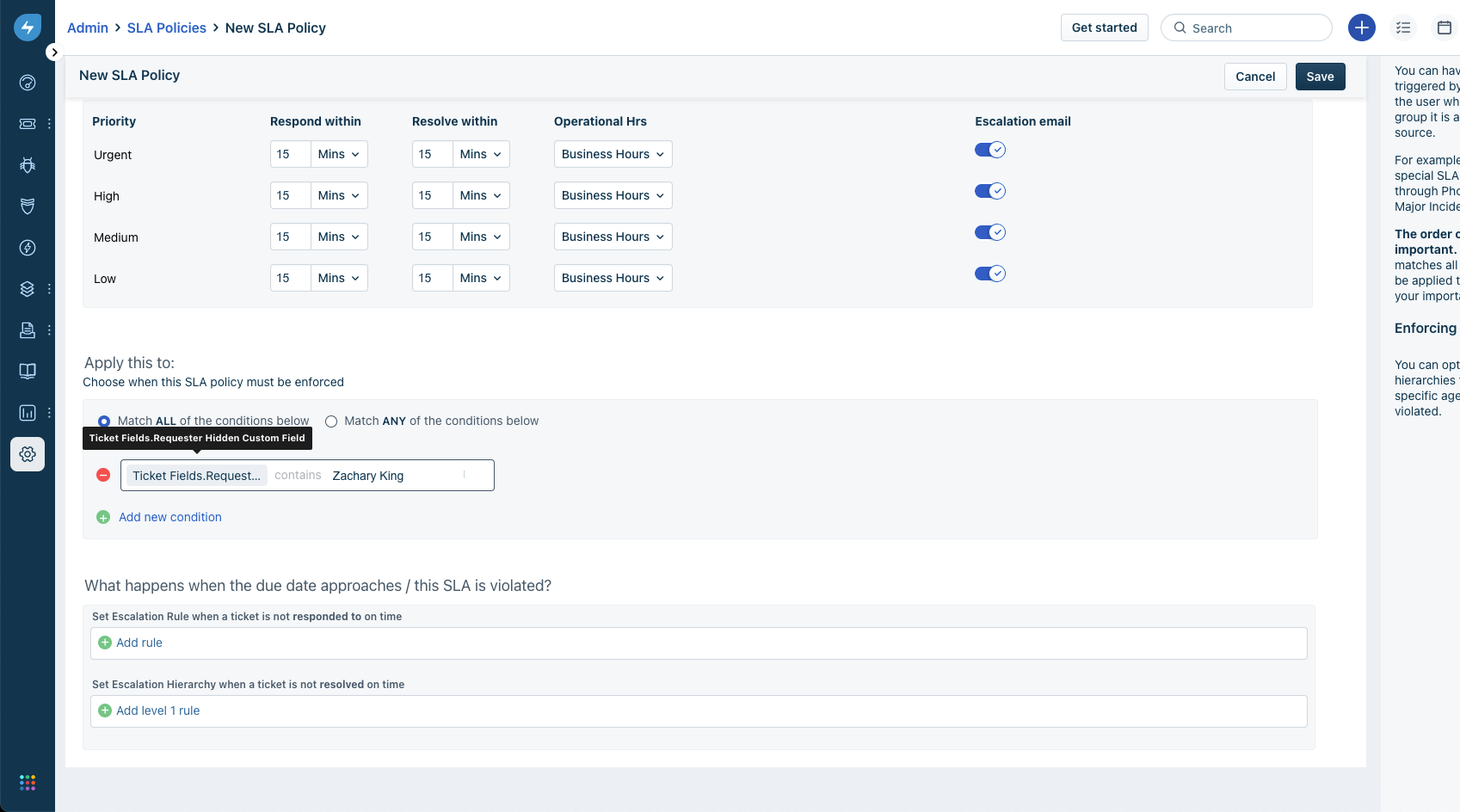
Then after that you can set the SLA policy as such

Hope that helps explain the process :)


Forum|alt.badge.img+6
  • Author
  • Skilled Expert
  • September 13, 2022

Just to let you know that the requester name is now back again in the SLA policy, but not the VIP user…

@zachary.king 


zachary.king
Top Contributor ⭐
Forum|alt.badge.img+16
  • Top Contributor ⭐
  • September 13, 2022

Just to let you know that the requester name is now back again in the SLA policy, but not the VIP user…

@zachary.king

Can you share a screenshot of this? I am still only seeing Ticket fields as a conditional option for SLAs


manns
Skilled Expert
Forum|alt.badge.img+10
  • Featured Influencer
  • September 13, 2022

IMO the need for VIP SLAs shouldn’t overlook the need for VIR (Very Important Role) differentiations too.

I know I wrote on this idea about a decade ago. I’ll have to dig it out.


manns
Skilled Expert
Forum|alt.badge.img+10
  • Featured Influencer
  • September 13, 2022

Here’s an extract on very important roles:

While VIP lists might be designed to protect IT’s behind, VIR lists are designed to protect the business :)


daminsky
Contributor
Forum|alt.badge.img+3
  • Contributor
  • July 5, 2024

Still not seeing Requester fields in the SLA Policy conditions.


Roxwell
Top Contributor ⭐
Forum|alt.badge.img+9
  • Top Contributor ⭐
  • July 9, 2024

Youtube video for future reference if someone wants a tutorial https://youtu.be/ZiG7nJ9XvS0