Question

Stop Outlook Reactions as replies on tickets

  • November 20, 2024
  • 8 replies
  • 81 views

SpadeCR
Skilled Expert
Forum|alt.badge.img+2

Hello, 

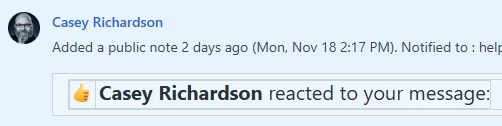
We have a rule/automation that re-opens tickets when a reply is received. Some of these replies are just reactions. Is there a way to stop these? Has anyone found a solution? 
 

8 replies

ITMike
Top Contributor ⭐
Forum|alt.badge.img+9
  • Top Contributor ⭐
  • November 20, 2024

@SpadeCR You can create a conditional in the reopen automator you created that checks to see if the Reply or note being added contains the words “reacted to your message”.  If it does do not re-open the ticket.


SpadeCR
Skilled Expert
Forum|alt.badge.img+2
  • Author
  • Skilled Expert
  • November 20, 2024

Unfortunately I think the reactions come through as an image as opposed to text. Let me check it. Thank you for the suggestion. 


ITMike
Top Contributor ⭐
Forum|alt.badge.img+9
  • Top Contributor ⭐
  • November 20, 2024

@SpadeCR ok so looking deeper it sends an HTML code as well as a body text. Under the conditional the field requester interaction is what you would identify.  I’m still working on if you will need to make an api call to get the body text and build an expression or if you can natively say is greater than etc.  I’ll keep looking as this has peeked my interest and honestly will also become a problem for us as well. Let me know what you find in the meantime.


Roxwell
Top Contributor ⭐
Forum|alt.badge.img+9
  • Top Contributor ⭐
  • November 21, 2024

@SpadeCR ok so looking deeper it sends an HTML code as well as a body text. Under the conditional the field requester interaction is what you would identify.  I’m still working on if you will need to make an api call to get the body text and build an expression or if you can natively say is greater than etc.  I’ll keep looking as this has peeked my interest and honestly will also become a problem for us as well. Let me know what you find in the meantime.


Do let us know ​@ITMike - that’s an interesting one. 


SpadeCR
Skilled Expert
Forum|alt.badge.img+2
  • Author
  • Skilled Expert
  • November 21, 2024

Yes a lot of folks interested in this one ​@ITMike 

Another conversation regarding this. 


ITMike
Top Contributor ⭐
Forum|alt.badge.img+9
  • Top Contributor ⭐
  • November 21, 2024

@Roxwell ​@SpadeCR  I found a solve for this.  I’m making some assumptions that you already have api credentials setup in your environment, If you don’t in order to do this process you will need to reach out to freshsworks for them to help you set one up.  I don’t recommend using your personal api key.

Please Note: this has a caveat if for some reason at any point in conversations a reaction to is used it is going to reopen the ticket. I couldn't find a way to only pull the information from the most recent reply so the body text is all conversations. I did test this just to be sure, my recommendation would be to make part of the action from the conditional to be if reaction is found close the ticket. That would keep additional responses and work from being added.  That is up to you though and once again assuming that if your tickets are closed they can’t be modified or re-opened.


SpadeCR
Skilled Expert
Forum|alt.badge.img+2
  • Author
  • Skilled Expert
  • November 21, 2024

Awesome work ​@ITMike. This is extremely valuable. And a scribe guide via PDF no less. 


Roxwell
Top Contributor ⭐
Forum|alt.badge.img+9
  • Top Contributor ⭐
  • November 21, 2024

@ITMike  - double points for documentation :)