Question

Automatically getting more info, then notifying when customer has responded

  • January 30, 2025
  • 13 replies
  • 106 views

JimNorton
Contributor
Forum|alt.badge.img

Hello!

My desired workflow:

Customer emails us asking for records. We setup an automation in Freshdesk to automatically email the customer back with a list of what we need exactly from them to pull records. Then customer responds. We then can process their Freshdesk ticket.


The problem is that I am unable to discern, by looking at the list of tickets, when the customer has supplied this information. The ticket always indicates “New”. 

Is there any way to configure Freshdesk to let me know when a customer has responded to a ticket based on a reply from an automation?


Thank you

13 replies

Roxwell
Top Contributor ⭐
Forum|alt.badge.img+9
  • Top Contributor ⭐
  • January 31, 2025

“New” indicates the first response SLA has not yet breached / been achieved. The reply from an automation to the customer will not meet the response SLA. 

Therefore, “Requestor Responded” will not show in the state until the First response is complete. 

I would have a workflow that says, when requestor replies to “Conditions for my specific ticket”, then tag that ticket, and have a separate view of those tickets, to show that the requestor responded to those particular types of ticket. 


ITMike
Top Contributor ⭐
Forum|alt.badge.img+9
  • Top Contributor ⭐
  • January 31, 2025

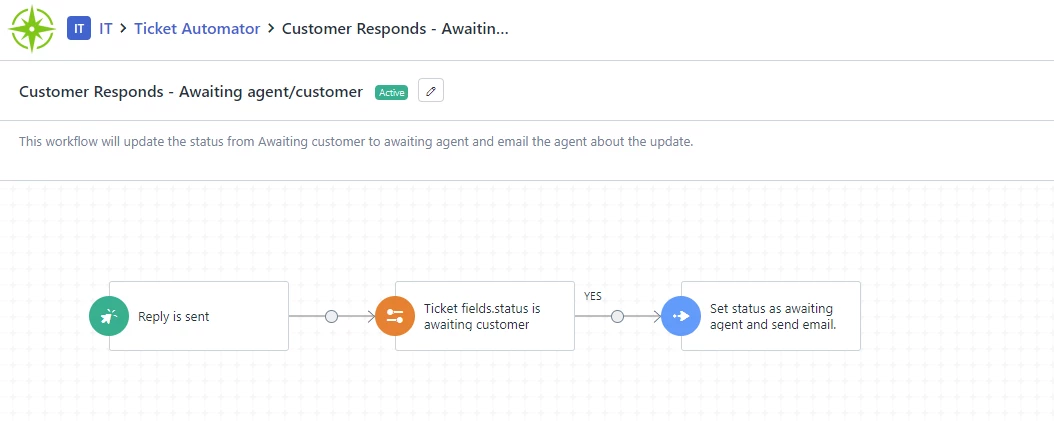
@JimNorton We do something similar, I created custom status of awaiting agent and awaiting customer.  Whenever the system sends the email I use that same action to set the status as awaiting customer and then I have a separate Automator that when a customer replies it sets the status to awaiting agent, you could use a different custom status to set the status and you could also set a group at the same time.


JimNorton
Contributor
Forum|alt.badge.img
  • Author
  • Contributor
  • January 31, 2025

“New” indicates the first response SLA has not yet breached / been achieved. The reply from an automation to the customer will not meet the response SLA. 

Therefore, “Requestor Responded” will not show in the state until the First response is complete. 

I would have a workflow that says, when requestor replies to “Conditions for my specific ticket”, then tag that ticket, and have a separate view of those tickets, to show that the requestor responded to those particular types of ticket. 


Roxwell,


Sincerely thank you for responding.

What would be the “catch” that I can use to identify when the customer has responded to the automation? I can’t seem to find anything that would identify this. I’d like to catch the response, and add an agent at that point.


JimNorton
Contributor
Forum|alt.badge.img
  • Author
  • Contributor
  • January 31, 2025

@JimNorton We do something similar, I created custom status of awaiting agent and awaiting customer.  Whenever the system sends the email I use that same action to set the status as awaiting customer and then I have a separate Automator that when a customer replies it sets the status to awaiting agent, you could use a different custom status to set the status and you could also set a group at the same time.


Sincerely thank you for responding.

What would be the “catch” that I can use to identify when the customer has responded to the automation? I can’t seem to find anything that would identify this. I’d like to catch the response, and add an agent at that point.


ITMike
Top Contributor ⭐
Forum|alt.badge.img+9
  • Top Contributor ⭐
  • January 31, 2025

The event trigger is reply is sent and note added is of type any, followed by a conditional that looks to see if the ticket fields.status is “awaiting customer” then whatever actions you want to take.


JimNorton
Contributor
Forum|alt.badge.img
  • Author
  • Contributor
  • January 31, 2025

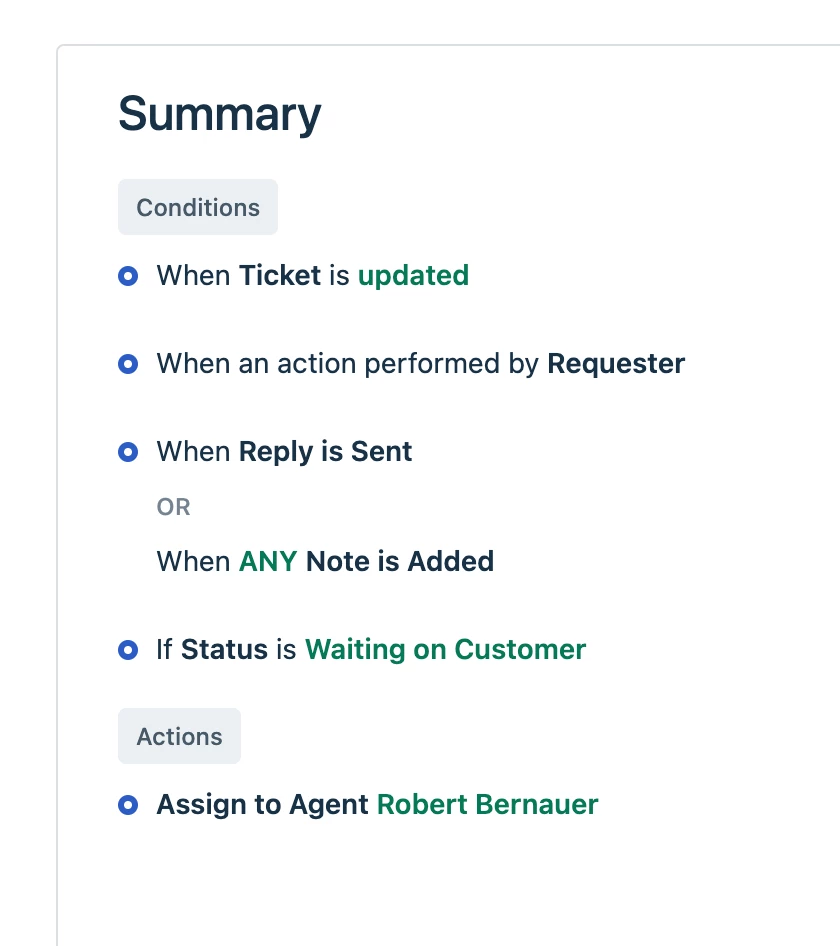
So, this is what I have in “ticket updates” automation section. I can confirm during my first automation when ticket is created, that the status “Waiting on Customer” is added, and it shows in the ticket list.

This does not seem to “capture” when the customer responds to the initial automation email with updated information. It does not “Add Agent” at the bottom.


ITMike
Top Contributor ⭐
Forum|alt.badge.img+9
  • Top Contributor ⭐
  • January 31, 2025

Are you saying this is combined with the same automator as the one that sets it to waiting on customer? If you are it has to be a separate Automator not all combined into one.


JimNorton
Contributor
Forum|alt.badge.img
  • Author
  • Contributor
  • January 31, 2025

Are you saying this is combined with the same automator as the one that sets it to waiting on customer? If you are it has to be a separate Automator not all combined into one.


No sir. I have this in the “Ticket Updates” set of automations rules (as opposed to the “Ticket Creation” set of automation rules. This (the image) is all that is setup for this rule. The automation that sets it as waiting on customer is in the “Ticket Creation” set of rules and it works fine.


  • Community Debut
  • February 11, 2025

To resolve your issue, create a custom ticket status (e.g., “Awaiting Customer Response”) in Freshdesk and configure an automation that triggers when a customer submits a request. This automation should send your predefined response and set the ticket status to “Awaiting Customer Response”. Then, create a second automation that detects when a customer replies to a ticket in this status, updating the status back to “Open” or a custom value like “Info Received” and optionally adding a tag. This way, tickets requiring action will clearly shift from “Awaiting Customer Response” to an active status, and you can create a custom view filtered by the new status/tag to quickly identify ready-to-process tickets.


naps2
Community Debut
  • Community Debut
  • February 12, 2025

Automating information retrieval and response notifications can greatly improve efficiency and customer engagement. Streamlining this process ensures timely follow-ups and better service!


ITMike
Top Contributor ⭐
Forum|alt.badge.img+9
  • Top Contributor ⭐
  • February 20, 2025

@JimNorton where this automator is in your order of automators matters, If other automators also rely on some of the same things it would not run.  For testing purposes put that automator at the very top of your automator order list and try it again.  I’ve had that be the issue a ton of times.


katy33
Community Debut
  • Community Debut
  • July 8, 2025

@JimNorton You can also try using API (webrequest) instead of action node in the workflow, to send the first email back to the customer.

https://api.freshservice.com/#create_a_reply

This will remove the ‘new’ tag when the customer replies back.


Kenn1994
Community Debut
Forum|alt.badge.img+2
  • Community Debut
  • July 14, 2025

We did something like this too. We created a custom status called “Awaiting Customer Response” and set it when we send out that first email asking for more info. Then we made a separate automation that checks when a reply comes in and moves it to “Open” or “Info Received” so it stands out in the view.

On a side note, we also document these steps clearly for the team in a third party app we currrently use which is eesel

Hope this helps!