


Solved

How do I add further information to a ticket auto rpely?

  • February 5, 2026
  • 3 replies
  • 20 views

Forum|alt.badge.img

Hey there,

I was wondering how or is it possible to add further information to an auto reply (which group it’s assigned to etc.) to help with email filtering?
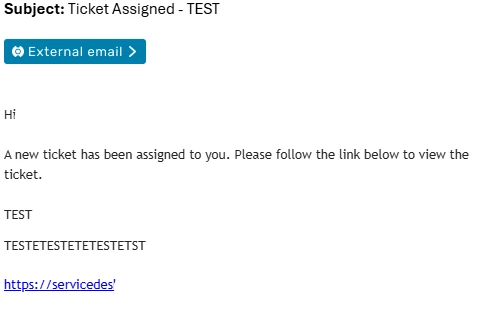
It would be amazing to add it to the Subject if possible, as we’ve got a fair amount of groups in our servicedesk it would prove useful.

Thanks!
Sam

Best answer by Roxwell

Go into Email Notifications » Ticket Assigned (based on your screenshot), and then use the placeholders to edit the template and include more detail

3 replies

Roxwell
Top Contributor ⭐
Forum|alt.badge.img+9
  • Top Contributor ⭐
  • Answer
  • February 10, 2026

Go into Email Notifications » Ticket Assigned (based on your screenshot), and then use the placeholders to edit the template and include more detail


Forum|alt.badge.img
  • Author
  • Apprentice
  • February 10, 2026

Go into Email Notifications » Ticket Assigned (based on your screenshot), and then use the placeholders to edit the template and include more detail

Hey Roxwell,

Thank you, can you do this specific to the Group? We have multiple groups and I’d like this only to be changed for one of them.

Thanks!
Sam


Roxwell
Top Contributor ⭐
Forum|alt.badge.img+9
  • Top Contributor ⭐
  • February 12, 2026

No, that’s for all groups.

The only way to do that is turn off the notification, and then have a workflow trigger on Comment is added, of type public, and then a condition for your specific group, with thier email, and then copy the main template into the workflow for everyone else’s group

