Question

API Authentication with OAuth

  • October 10, 2024
  • 8 replies
  • 163 views

megank
Community Debut

I’m creating an integration to create Freshservice tickets using phone call data. This service is intended to live outside the Freshservice platform but I cannot find documentation for using OAuth with the APIs.

I saw on a community post that Freshservice APIs now support OAuth flow. The article directed me to your documentation at https://api.freshservice.com/#intro. However, only api key authentication is mentioned.

Can someone share the steps I need to take to implement my integration using OAuth authentication flow?


8 replies

Daniel Söderlund
Top Contributor ⭐
Forum|alt.badge.img+14

This is the best I have found https://developers.freshworks.com/docs/app-sdk/v3.0/service_ticket/oauth-implementation-in-apps/oauth-in-external-apps/  I haven’t tested it my self yet. I’m planing to test in Post man first see that I can get it to work there. 

Next step is to see how to use it in a web request node. 


Sharon Roseline H
Community Debut

Hi Megank, 


Unfortunately, utilising this via Postman or within workflow isn’t feasible, as OAuth functionality is exclusively supported for marketplace apps currently.

I hope this helps :)


Daniel Söderlund
Top Contributor ⭐
Forum|alt.badge.img+14

Hi Megank, 


Unfortunately, utilising this via Postman or within workflow isn’t feasible, as OAuth functionality is exclusively supported for marketplace apps currently.

I hope this helps :)

wrong, I managed to get to work in Postman with help of someone here on the forum :) 


Sharon Roseline H
Community Debut

Hi Daniel, 

Thanks for pointing that out! That’s great to hear. If you’re open to it, could you share how you got it working in Postman? It’ll definitely help other community members :)


  • Community Debut
  • July 13, 2025

Freshservice does support OAuth, but it's not documented on the public API page. You need to register your app via Freshworks Developer Portal. After registration, use standard OAuth 2.0 flow to get the access token. Contact Freshservice support for app approval and exact scopes needed.


Daniel Söderlund
Top Contributor ⭐
Forum|alt.badge.img+14

Hi Daniel, 

Thanks for pointing that out! That’s great to hear. If you’re open to it, could you share how you got it working in Postman? It’ll definitely help other community members :)

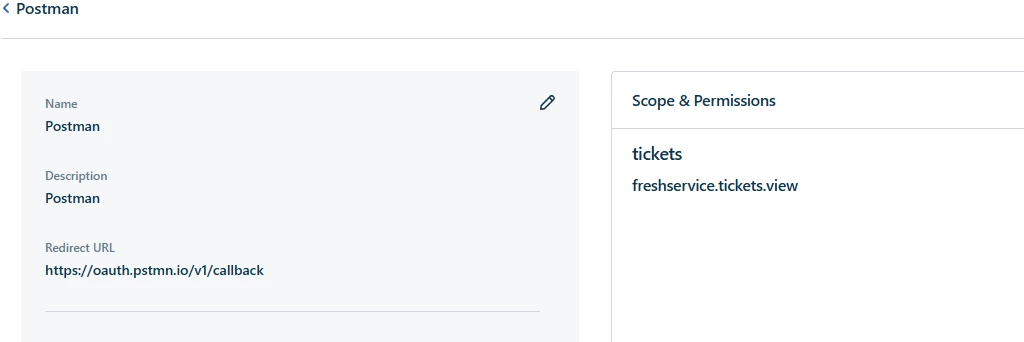
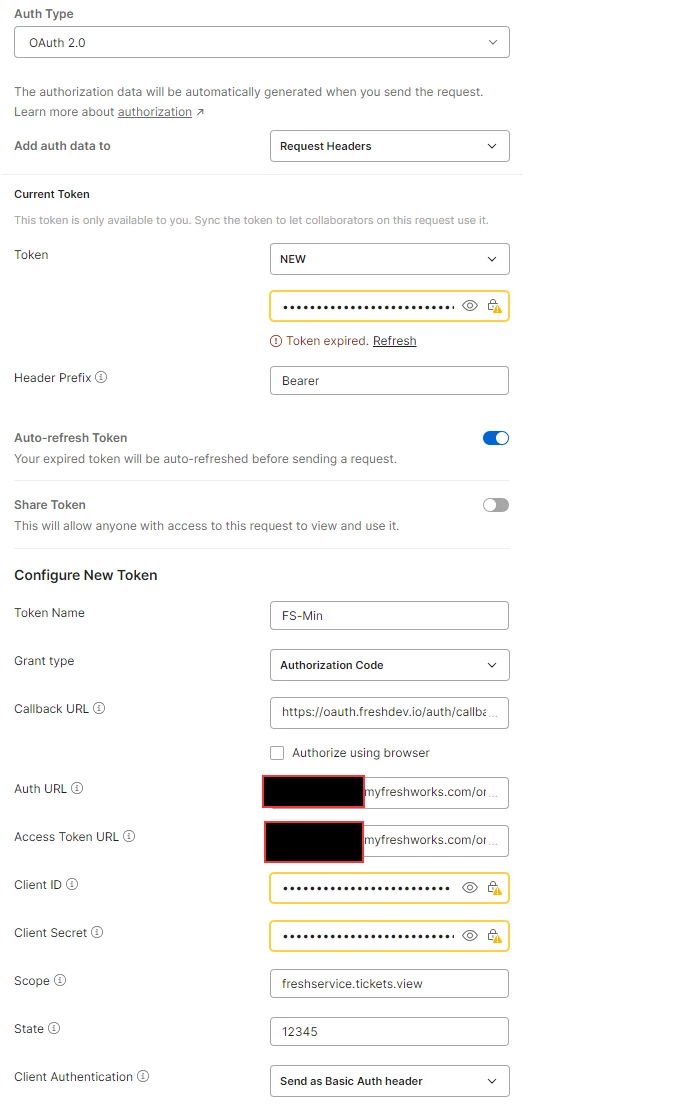
I’m going to tray :)  And as ​@woordnelson say, you generate the auth pwn/key etc in the dev portal. 
Keep in mind this is still tied to the agnet that logs into the dev portal 


In Dev portal 

https://oauth.pstmn.io/v1/callback


In postman 

https://oauth.freshdev.io/auth/callback

https://instancename.myfreshworks.com/org/oauth/v2/authorize

https://instancename.myfreshworks.com/org/oauth/v2/token


I actually faced a very similar issue while working on my own external project ti 84 calculator online. I needed to connect an outside service with Freshservice, and the OAuth documentation wasn’t very clear at first — it looked like only API key auth was supported.

Here’s how I finally got it working:

1. Create an OAuth App inside Freshservice
In the Admin panel, go to the section for API Credentials / OAuth Apps and create a new app. Once you create it, you’ll get:

  • Client ID

  • Client Secret

  • Redirect URI

These three are required to start the OAuth handshake.

2. Use the standard Authorization Code OAuth flow
Even though the docs don’t spell it out clearly, Freshservice uses the normal sequence:

  • Redirect user to the authorization URL

  • Receive the authorization code

  • Exchange it for an access token

  • Use the token as:
    Authorization: Bearer <access_token>

3. Token refresh works normally
The access token expires, but the refresh token lets you request a new one automatically. I had missed this step initially and got repeated 401 errors.

4. Same API endpoints — just with Bearer tokens
The API key examples in the docs still show up everywhere, but once OAuth is active, the exact same endpoints work fine with bearer authentication.

After setting it up this way, my integration started working smoothly.
Hope this helps it took me a bit of trial and error, but OAuth does work once everything is configured correctly.


Daniel Söderlund
Top Contributor ⭐
Forum|alt.badge.img+14

Ya I got it to work, just not in Freshservice to Freshservice . Due to Freshservice don’t have the option for custom header.