

Question

change the requester email address using webhook

  • July 21, 2023
  • 7 replies
  • 113 views

i.cameron
Skilled Expert
Forum|alt.badge.img+2

Simple request, please.

How do I write a webhook that changes the requester’s email address, when a ticket is raised, to a specific, pre-existing requester email address. 

example, change from my email address (i.cameron@abdn.ac.uk) to a generic address, in this case, unknown@abdn.ac.uk


we used to have this working but suspect change to APIv2 has broken it. 



7 replies

Daniel Söderlund
Top Contributor ⭐
Forum|alt.badge.img+14

Simple request, please.

How do I write a webhook that changes the requester’s email address, when a ticket is raised, to a specific, pre-existing requester email address. 

example, change from my email address (i.cameron@abdn.ac.uk) to a generic address, in this case, unknown@abdn.ac.uk


we used to have this working but suspect change to APIv2 has broken it. 



Do you like to change the requester of the ticket to another requester or the newly created requesters e-mail ? 


i.cameron
Skilled Expert
Forum|alt.badge.img+2
  • Author
  • Skilled Expert
  • July 21, 2023

hi Daniel, 

we want to change to the requester to be

unknown@abdn.ac.uk


the requester unknown@abdn.ac.uk is already an existing requester.. 

thanks, iain


Daniel Söderlund
Top Contributor ⭐
Forum|alt.badge.img+14

Hmm,I tried this and it was working in my test environment. 


PUT https://foo.freshservice.com/api/v2/tickets/123456?bypass_mandatory=true

{
"requester_id": 53000031995
}


I use the ?bypass_mandatory=true so I don’t have to update any field that is set to mandatory. 
Could it be that you have added/changed a field lately? 


i.cameron
Skilled Expert
Forum|alt.badge.img+2
  • Author
  • Skilled Expert
  • July 21, 2023

hi Daniel,

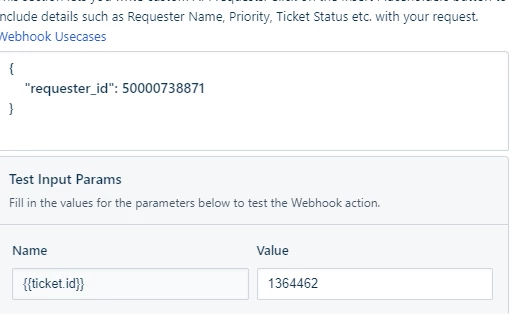
I’ve changed to using the requester_id, and that works when I test the webhook using the “Test Input Parameters” box inside the workflow creator thus:


so that is a step forward; i suspect the formatting of the callback URL may be wrong; it’s currently

https://uoa.freshservice.com/api/v2/tickets/{{ticket.id}}?bypass_mandatory=true

thanks

iain


Daniel Söderlund
Top Contributor ⭐
Forum|alt.badge.img+14

hi Daniel,

I’ve changed to using the requester_id, and that works when I test the webhook using the “Test Input Parameters” box inside the workflow creator thus:


so that is a step forward; i suspect the formatting of the callback URL may be wrong; it’s currently

https://uoa.freshservice.com/api/v2/tickets/{{ticket.id}}?bypass_mandatory=true

thanks

iain

There are another placeholder that you need to use. Can't remember the top of my head. Check the list. 

Ticket. Id. Number something like that. The ones you use has the prefix. 


Check the execution logs for clues. 


i.cameron
Skilled Expert
Forum|alt.badge.img+2
  • Author
  • Skilled Expert
  • July 24, 2023

@Daniel - thank you for the assistance. For anyone else who has the same issue, here’s how I did fix it: 

The Call Back URL is

https://mydomain.freshservice.com/api/v2/tickets/{{ticket.id_numeric}}?bypass_mandatory=true


I used the API key for authentication.


The content field is

{"ticket":

  {
    "requester_id": 123456789,
     "requested_for_id": 12345678950000738871
  }  
}


The outcome is that for any ticket, the requester & requested for fields are changed to the Requester# corresponding to a specific requester (called Unknown in our instance). 

Worth noting that changing the requested_for field only works for Service Cat items; makes sense, but caught me out as I was testing by sending emails to Fresh, which created INC- tickets. oops. 


best wishes

iain


Daniel Söderlund
Top Contributor ⭐
Forum|alt.badge.img+14

Remember to like subscribe and hit that notifikation bell… ops wrong site :) 

But remember to mark a post as a solution then ppl can see that it’s solved.