

New Idea

Ability to globally agent groups

Related products:Freshservice
  • April 3, 2025
  • 4 replies
  • 32 views

Medic1334
Top Contributor ⭐
Forum|alt.badge.img+9

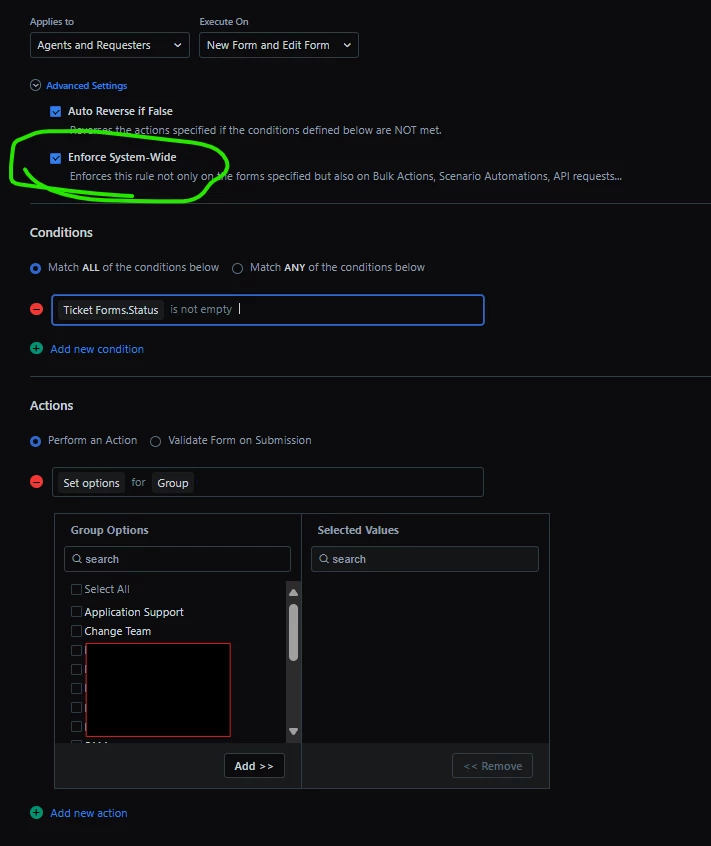
We have some agent groups that we’d like to hide as they are used for service item visibility and will never have tickets assigned to them.  I have a business rule that works inside the ticket itself for the dropdown but when selecting group from the ticket list view, every agent group is visible regardless of business rule. 

Being able to hide a group from the list (any list really), be it via business rule or a “deactivate” option in the group itself that hides it from the dropdown would be excellent as it would allow for retention of data in that ticket should something be needed down the road and the group has been “retired” from use in addition to my use case. 

Thoughts ​@mbutler ​@Daniel Söderlund  ​@zachary.king ?

4 replies

mbutler
Top Contributor ⭐
Forum|alt.badge.img+10
  • Top Contributor ⭐
  • April 3, 2025

You’ll probably end up with the usual here - a workaround. In Workflow Admin, if a ticket is assigned to a group you don’t want, move it to a different group. I agree, it would be better to hide the option altogether.


Medic1334
Top Contributor ⭐
Forum|alt.badge.img+9
  • Author
  • Top Contributor ⭐
  • April 3, 2025

You’ll probably end up with the usual here - a workaround. In Workflow Admin, if a ticket is assigned to a group you don’t want, move it to a different group. I agree, it would be better to hide the option altogether.

We have this set up as an insurance policy for those groups already 🙂 .

We also use it to keep tickets in our restricted groups where if somebody tries to move something out, it gets bounced right back to the group that it started from. The problem with that one is that you have to do a different workflow automator for each one so that you are able to return it to the original group 😞


Hubert.Panszczyk
Top Contributor ⭐
Forum|alt.badge.img+6

I don’t really have a way to test it in my system right now, but have you tried setting it with that checkbox?
I don’t think it’s very likely to work, but I’m throwing the idea out there just in case it’s worth testing. B)


Medic1334
Top Contributor ⭐
Forum|alt.badge.img+9
  • Author
  • Top Contributor ⭐
  • April 4, 2025

I have checked that box, but it does not apply to the Ticket list UI unfortunately.  There’s been several point outs made around this (Example: Removing the ability to close tickets from that UI).