Closed for Voting

Auto-close tickets after a certain period of time

Related products:Freshdesk
  • January 25, 2015
  • 5 replies
  • 13 views

 I was trying to set up an own rule with the dispatch'r, that tickets, which are not resolved and older than e.g. 5 days, closes automatically.


There is a conditional tag "created" but it only allows to select "during" as operator. Would be nice to have another operator like "older" and select the days.


If someone has another suggestion how this could be achieved, let me hear.


Anyway best helpdesk solution for me right now.

5 replies

Hi Rafael,


Dispatch'r rules are executed once as soon a ticket is received at your helpdesk. 

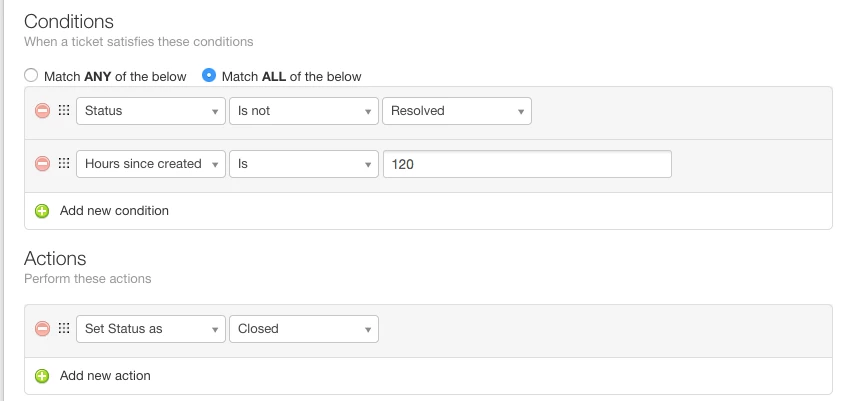
To close tickets after x days, you can create a Supervisor rule. These rules are executed on an hourly basis. 

If the conditions mentioned in the rule are met, the corresponding actions will be performed.


Please check the below screenshot:


I don't see this screen. I can't find a trigger that is hours since created. 


Forum|alt.badge.img+7

It is now under Automations > Time triggers. But if you are on the Sprout plan, the free version, then you will not see this. 


hemanth.ramya
Community Manager
Forum|alt.badge.img+9
  • Community Manager
  • August 27, 2020

Hello Cousett,


As @Markmentioned, you can find the condition 'Hours sine created' under Time triggers automation (Admin > Automation). Please note that this feature is available from the Blossom plan in Freshdesk. Refer to this article to get detailed insights on the same.


Feel free to drop an email to support@freshdesk.com for any further queries. Cheers!


geebranz
  • March 9, 2021

This has been resolved guys! :)


We can do this!