

New Idea

Allow more data sources in Ticket Fields

Related products:Freshservice
  • February 28, 2024
  • 7 replies
  • 62 views

Medic1334
Top Contributor ⭐
Forum|alt.badge.img+9

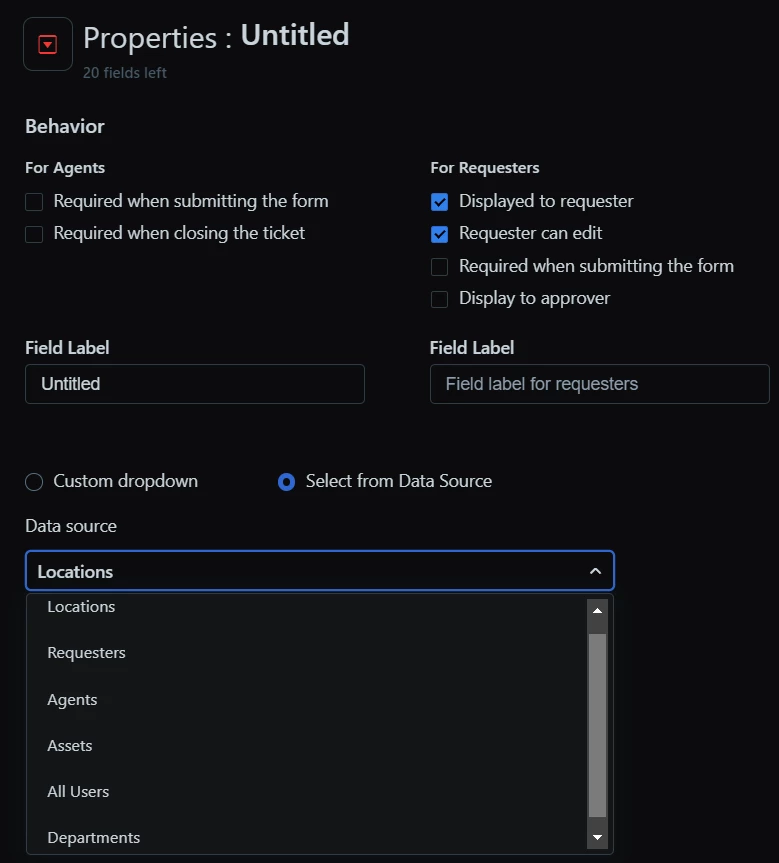
In the field manager, for a dropdown you can select a data source as listed below but no additional options. We’d like to be able to use a custom object table with a list that we have to force specific items to be selected if conditions are met in a ticket (in this case vendors we work with). We cannot use a custom object table to do this, or even the vendor table that is native and being able to do so would be a huge capability lift.



7 replies

Forum|alt.badge.img+3
  • Active Contributor
  • April 10, 2024

In the field manager, for a dropdown you can select a data source as listed below but no additional options. We’d like to be able to use a custom object table with a list that we have to force specific items to be selected if conditions are met in a ticket (in this case vendors we work with). We cannot use a custom object table to do this, or even the vendor table that is native and being able to do so would be a huge capability lift.



Curious, was your screenshot here from creating a field in the Service Catalog item or Incident?

We’d love to have access to Assets as a data source when creating a drop-down field in the Incidents form too, also no custom object option either.


Medic1334
Top Contributor ⭐
Forum|alt.badge.img+9
  • Author
  • Top Contributor ⭐
  • April 10, 2024

My screenshot was from the field manager setup (https://tenantname.freshservice.com/ws/2/admin/form_fields/ticket#ticket_fields).  Assets doesnt really make sense to add as a dropdown as you have access to associate assets in the main ticket fields at the top.


Forum|alt.badge.img+3
  • Skilled Expert
  • April 10, 2024

Custom objects as datasource in ticket fields would make life so much easier. Also the possibility to filter on them in the ticket list. Now if I have a field with a custom object as datasource on a service request, I have to do some custom mapping in a workflow from the service request field with custom object to another ticket field which isn’t based on that custom object. It’s really complicated for something that seems to be basic functionality and is already implemented in Freshdesk: 


Forum|alt.badge.img+3
  • Skilled Expert
  • May 17, 2024

This is in the new release notes :-)


Custom objects and lookup field enhancements

Category: IT Service Management

Users can now associate custom objects with ticket fields for increased flexibility. Additionally, analytics support has been extended to include lookup fields across tickets, changes, and service items, ensuring accurate reporting. The lookup field will be reportable, just as any other association, to empower users to report not just on the lookup field value but also on the associated properties. 

More details here


kpatterson
Top Contributor ⭐
Forum|alt.badge.img+8
  • Top Contributor ⭐
  • May 24, 2024

Adding my emphasis for this!  We have a number of Service Requests that use the same list of items.  Ex: New Hire forms and Computer Upgrade forms have the same list of computer models.  We have to remember to update both forms each time Dell or Apple refresh their models.  And, invaribly, we forget to update the Asset section until the first time we are setting up one of the new computer models.   A single custom object table where we could have “current” and “all” computer models lists would be super helpful!


Daniel Söderlund
Top Contributor ⭐
Forum|alt.badge.img+14

Adding my emphasis for this!  We have a number of Service Requests that use the same list of items.  Ex: New Hire forms and Computer Upgrade forms have the same list of computer models.  We have to remember to update both forms each time Dell or Apple refresh their models.  And, invaribly, we forget to update the Asset section until the first time we are setting up one of the new computer models.   A single custom object table where we could have “current” and “all” computer models lists would be super helpful!

Have you looked at using a Custom object to store the data in it and use it the drop down?( If you have pro or higher )


Forum|alt.badge.img+3
  • Skilled Expert
  • June 5, 2024

Hello, just adding to this request. The feature is live now but it’s missing the last finishing touches.

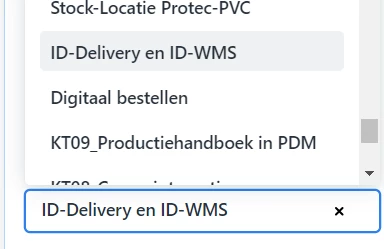
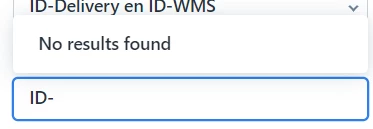
If the Custom Datasource values contains dashes “-” you can find them by typing. As you can see below in an example for a custom field I added to our ticket form.


It also seems that when a custom datasource is used for a ticket field that I can’t use that field in analytics.