

New Idea

Loops needed in Workflow Automator

Related products:Freshservice
  • April 5, 2024
  • 16 replies
  • 276 views

mbutler
Top Contributor ⭐
Forum|alt.badge.img+10

I recently setup an emergency notification system in the event of a Major Incident. My requirements for this project were to call & email approximately 35 people when a major incident occurs or when an incent is upgraded to a major incident.

My first inclination was to create a custom object and add the 35 people needed to that list - boy am I happy I didn’t do that, because I noticed there is no way to get every value out of a custom list. You can get a single value, but not every value.

We really need a way to iterate through a custom object to use every value in the list. This could be done in several ways For Each loop, while loop, etc.

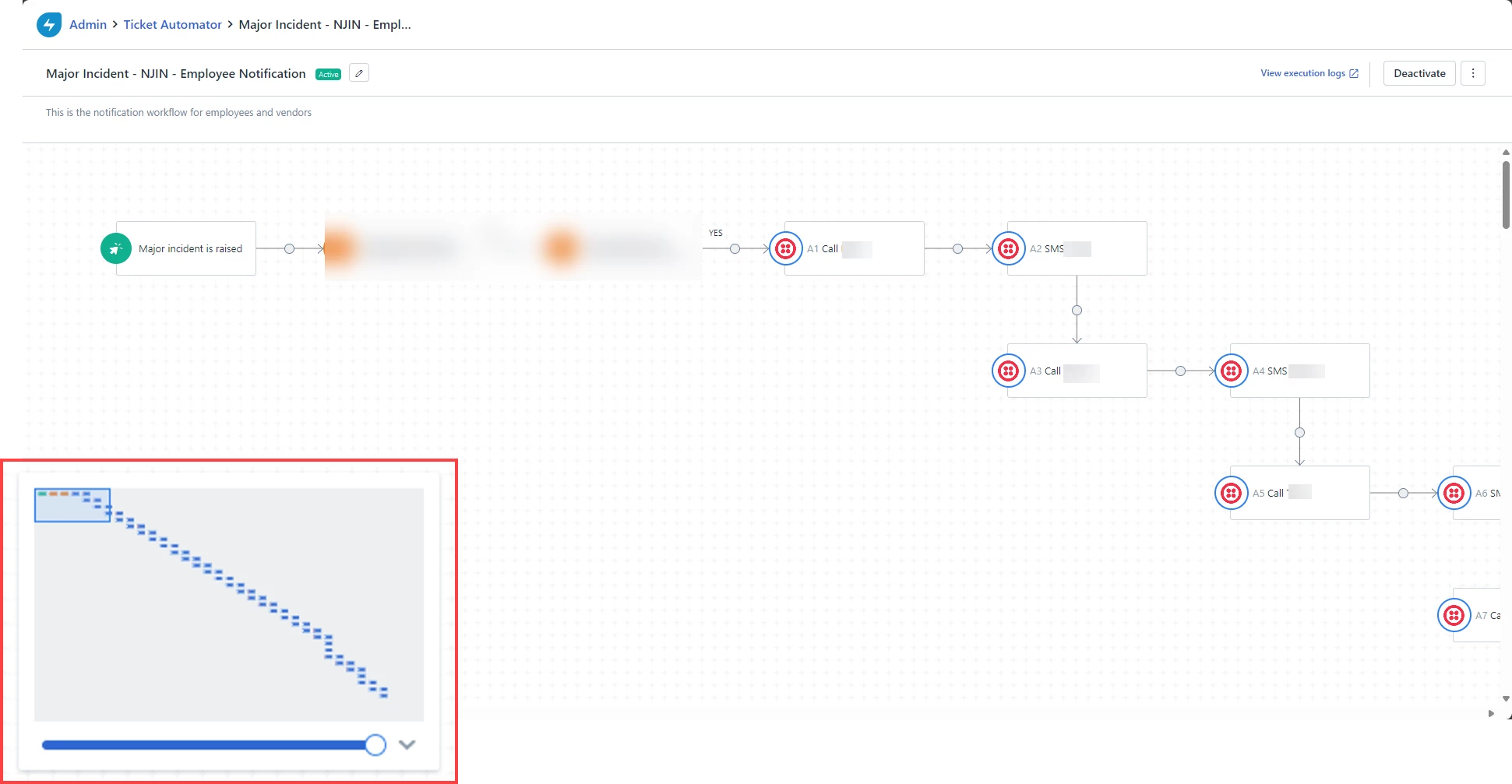
When I found that couldn’t be done, I had to tediously add all 35 members of the on-call team to a very long workflow. The problem with that is that it introduces the possibility of mistakes. Just take a look at the image below that shows my workflow - everything at step 4 and beyond is basically a clone of the steps before it - what a tedious process.

 

16 replies

mbutler
Top Contributor ⭐
Forum|alt.badge.img+10
  • Author
  • Top Contributor ⭐
  • April 5, 2024

@OlivierH - I think this request might be right up your alley. My original goal was to use the On-Call management, but unfortunately, there’s a limit of 10 notifications that can occur via On-Call management and I wanted to alert my entire team during a major incident.

Having the ability to perform a For Each would be great for circumstances just like this.


Forum|alt.badge.img+7

Turing Complete Workflow Automator


  • Community Debut
  • October 21, 2024

A conditinal loop is an obivious requirement.

I am in need of a loop to handle API calls when API rate limit is exhausted, I need to be able to wait till the rate limit refresh and then continue.

Also, in the above example, if a member needs to be replaced in the workflow to receive call & email. I see that maintainance of the workflow is also a challenge without loops.


Daniel Söderlund
Top Contributor ⭐
Forum|alt.badge.img+14

@pranz  It’s on the road map but next year. Keep a eye out for next road mat session, it’s normally around  the 17th each month. You can find them if you click the ? and product update in your Freshservice instance. 

Best solution now is using some external platform that can handle loops and cue’s.  Could be a powershell or power automate if you use windows platform. There are support for SSH to a linux server as well. Not sure if there are a orchestration app for linux. 


mbutler
Top Contributor ⭐
Forum|alt.badge.img+10
  • Author
  • Top Contributor ⭐
  • October 22, 2024

A conditinal loop is an obivious requirement.

I am in need of a loop to handle API calls when API rate limit is exhausted, I need to be able to wait till the rate limit refresh and then continue.

Also, in the above example, if a member needs to be replaced in the workflow to receive call & email. I see that maintainance of the workflow is also a challenge without loops.

Pranz - when I was importing all of my old data from my old ticketing system, I built in some logic to deal with the API wait times. I understand why they have to be there - they don’t want anybody essentially DDOSing their API - it makes sense, but required me to build in the logic so I wasn’t temporarily denied.


DanielRuff
Top Contributor ⭐
Forum|alt.badge.img+9
  • Top Contributor ⭐
  • October 23, 2024

A conditinal loop is an obivious requirement.

I am in need of a loop to handle API calls when API rate limit is exhausted, I need to be able to wait till the rate limit refresh and then continue.

Also, in the above example, if a member needs to be replaced in the workflow to receive call & email. I see that maintainance of the workflow is also a challenge without loops.

Pranz - when I was importing all of my old data from my old ticketing system, I built in some logic to deal with the API wait times. I understand why they have to be there - they don’t want anybody essentially DDOSing their API - it makes sense, but required me to build in the logic so I wasn’t temporarily denied.

@mbutler Freshworks can whitelist a few users if required so they don’t get temporarily denied. FYI we have this for a few users.


DanielRuff
Top Contributor ⭐
Forum|alt.badge.img+9
  • Top Contributor ⭐
  • October 23, 2024

To avoid misunderstandings: I’m talking about whitelisting because of temporary blocking. We have a technical user who sends hundreds or thousands of requests to the API for data synchronization. Whitelisting does not disable the rate limit.


Forum|alt.badge.img+11
  • Skilled Expert
  • October 29, 2024

I am happy to see that this has more than 15 votes now.  I am desperate to see conditional looping as it would enable and support ingenuity within Freshservice itself rather than relying on workarounds, external products etc.


mbutler
Top Contributor ⭐
Forum|alt.badge.img+10
  • Author
  • Top Contributor ⭐
  • October 29, 2024

I am happy to see that this has more than 15 votes now.  I am desperate to see conditional looping as it would enable and support ingenuity within Freshservice itself rather than relying on workarounds, external products etc.

You and me both - I have a few good ones that are that way (or at least I think they are good). Thanks for the upvotes everybody - This is hugely important and will save me lots of time creating repetitive workflows.


Forum|alt.badge.img

Yes please! 

Without looping, we’re forced to create rather lengthy workflows with multiple nodes. This would cut down the amount of nodes to get around this and the amount of work needed to manage those nodes. 


Daniel Söderlund
Top Contributor ⭐
Forum|alt.badge.img+14

Yes please! 

Without looping, we’re forced to create rather lengthy workflows with multiple nodes. This would cut down the amount of nodes to get around this and the amount of work needed to manage those nodes. 

It’s on the roadmap just push ahead 


mbutler
Top Contributor ⭐
Forum|alt.badge.img+10
  • Author
  • Top Contributor ⭐
  • December 3, 2025

@Kamakshi V - this idea was implemented on the November release.


Daniel Söderlund
Top Contributor ⭐
Forum|alt.badge.img+14

@Kamakshi V - this idea was implemented on the November release.


We need a how to and what and not to do thread :) 


mbutler
Top Contributor ⭐
Forum|alt.badge.img+10
  • Author
  • Top Contributor ⭐
  • December 4, 2025

@Kamakshi V - this idea was implemented on the November release.


We need a how to and what and not to do thread :) 

I created a loop yesterday. I have two items within my loop - I tested it. Here’s what I did to set mine up yesterday.

I wanted to use my example from this original thread. I still have my major incident notification that I wanted to use this for originally. Yesterday, I built it.

  1. I created a new custom object
    1. Name [string]
    2. MobilePhone [string]
    3. Notes [paragraph]
    4. Enabled [number]
  2. I populated the new custom object like the below
    1. Name: John Doe
    2. MobilePhone: +16025551212
    3. Notes: Any notes that I wanted for the user
    4. Enabled: 1 if enabled, 0 if disabled
  3. Create new workflow with the following steps:
    1. Major Incident Raised or tkt goes from any type to Major Incident
    2. Expression for TwiML Bin (Twilio Voice)
    3. Expression for SMS Body ** this allows me to modify the SMS Body in one location and then use that expression throughout the workflow changing it in a single place
    4. Post a message to channel (optional)
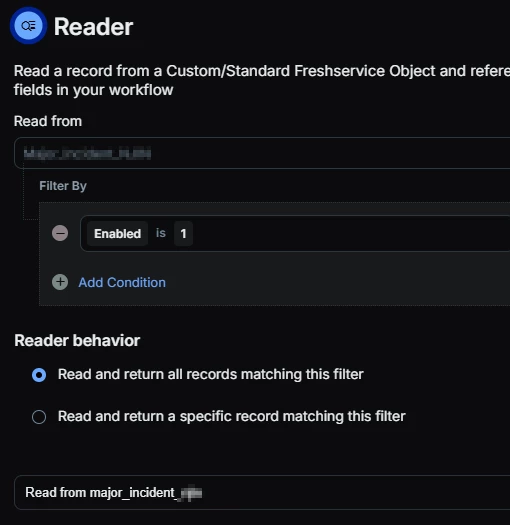
    5. Reader Node
      1. Read from: Custom table name
      2. Filter by Enabled is 1
      3. Read and return all records matching this filter
    6. Loop Block
      1. For each loop type
      2. What should the loop run on? R# - Read from table_name
      3. Label: The label you want to use
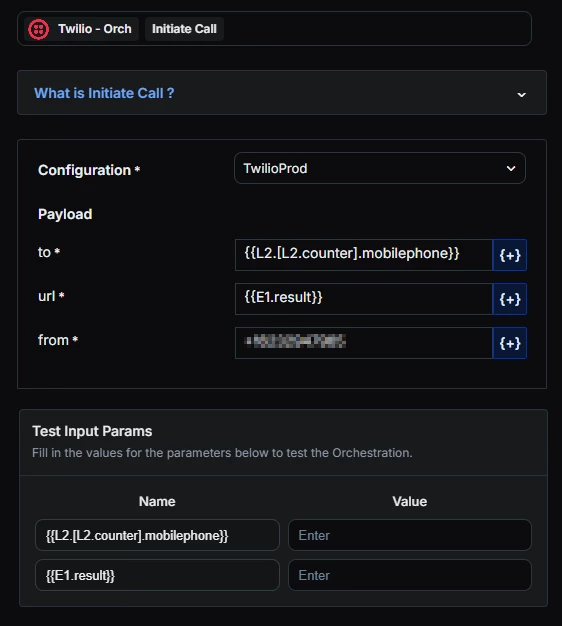
    7. Loop block content: You can have up to 25 items inside of your loop block. I only have a need for two items in my loop block. I call my users and then send them a text message. 
      1. Each item in my Loop looks like the below.
      2. to: loop counter for mobile phone

      3. url: my expression result - this allows me to modify the expression outside of my loop

      4. from: the from phone number for my twilio account

  4. Anything outside of your loop should go after it. I have some MS Teams notifications that inform me that the workflow finished running. This ensures we know when the workflow starts and finishes.

mbutler
Top Contributor ⭐
Forum|alt.badge.img+10
  • Author
  • Top Contributor ⭐
  • December 4, 2025

@Daniel Söderlund - Let me know if you need any more detail on the above


Daniel Söderlund
Top Contributor ⭐
Forum|alt.badge.img+14

@Daniel Söderlund - Let me know if you need any more detail on the above

I have had issues with, not being able to set fields with action nodes inside a loop. 
I hade issue that loop placeholders don’t return value in a Note action inside the loop.

Worked using API to set the field. 


Had issues with loops where I used Azure app node to add groups based on a CO I have. 
I like to add standard groups to a user. The loops halts and do not continue. the WFA.