Solved

Freshchat FAQ links Opening in a Blank Page

  • Dec 11, 2024 10:37 AM UTC
  • 2 replies
  • 151 views

Forum|alt.badge.img+1

When I click on a “View the entire article here” link in an FAQ link in my chat bot, it opens to a blank browser page on an internal url with no style applied. See images below:
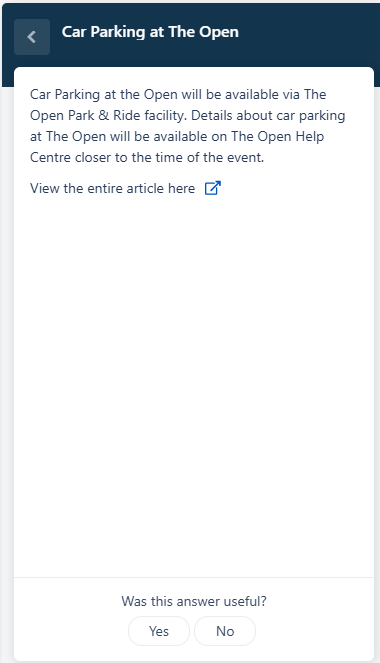

Link for an article
Unstyled Browser Window

I have three questions.

First, does anyone know if it is possible to have links open in a specific URL, such as the Freshdesk Knowledge Base where the bot is hosted? 

Second, does anyone how to apply a style to the article? 

Third, if the first/second are not possible, is it possible to disable the link all together? 


Thanks for your help.

Best answer by ThomasBuist

Hi,

We can disable the external link of the articles in the widget

Can you please add the below CSS in your FreshChat account Admin settings > Channels > Web > Select your widget > Choose Appearance > add the below-


.article-external-link {
    display: none !important;
}

Thank you, this is the solution I ended up employing last month after a bit of research.

View original
This topic has been closed for replies.

2 replies

srikanthkarunakaran
Skilled Expert
Forum|alt.badge.img+6

Hi,

We can disable the external link of the articles in the widget

Can you please add the below CSS in your FreshChat account Admin settings > Channels > Web > Select your widget > Choose Appearance > add the below-


.article-external-link {
    display: none !important;
}


Forum|alt.badge.img+1
  • Author
  • Apprentice
  • Answer
  • Jan 29, 2025 3:20 PM UTC

Hi,

We can disable the external link of the articles in the widget

Can you please add the below CSS in your FreshChat account Admin settings > Channels > Web > Select your widget > Choose Appearance > add the below-


.article-external-link {
    display: none !important;
}

Thank you, this is the solution I ended up employing last month after a bit of research.